We independently review everything we recommend. We may get paid to link out to retailer sites, and when you buy through our links, we may earn a commission. Learn more›
Best Gaming Chairs Under $300 in 2026: Tested for Lumbar & Comfort
ByMarcus Lee•Tech Product Reviewer•March 1, 2026•22 min read
Disclosure: As an Amazon Associate, we earn from qualifying purchases. It helps fund our testing at no extra cost to you.
Quick Answer
The GTRACING Gaming Chair ($129.98) is the best value gaming chair under $300 in 2026 — nearly 7,000 Amazon reviews, solid seat cushion, and proven reliability. If you can spend more, the FlexiSpot OC3 AIR-F ($159.98) delivers real ergonomics with mesh back and built-in lumbar at a price that still leaves budget room.
Key Takeaways
We tested 10 gaming chairs over 8 weeks — racing style, ergonomic, and hybrid designs
Built-in adjustable lumbar beats external lumbar pillows every time — no slipping, no repositioning
Best budget pick under $150: GTPLAYER Gaming Chair — solid for casual sessions
For ergonomics and back support: FlexiSpot OC3 AIR-F ($159.98) — mesh back, built-in lumbar, 4D headrest
Foam quality is the biggest predictor of how a chair feels after 12 months — not brand name
Testing period: December 2025 – February 2026 | Last price check: March 1, 2026 | Next review: September 2026
The gaming chair market is full of chairs that look impressive in product photos and feel awful after two hours. Racing-bucket seats, aggressive bolsters, and built-in lumbar pillows that migrate south within a week — most of it is furniture theater. We spent 8 weeks filtering through it, logging hours in 10 chairs, and tracking what actually happens to your back when you sit in them past the honeymoon period.
This guide covers 6 chairs across the full budget range — from a $129.98 budget pick to premium options above $300 if you want to see what you’re giving up. We’ve also included an honest comparison of gaming chairs versus ergonomic office chairs at the same price, because for some readers, the FlexiSpot OC3 AIR-F is the better answer even if it doesn’t look the part. If you game 6+ hours a day and your back is already talking to you, read the ergonomic section before you decide.
One thing that helped calibrate our testing: we were running sleep comfort research in parallel. Same principle applies — pressure distribution matters more than what the product looks like in a photo. A chair that feels plush on day one often feels like a park bench by month six.
We tested 10 gaming chairs from November 2025 through February 2026. Each chair was used as a primary seat for a minimum of 3 weeks — for gaming, remote work, and video calls — not just a weekend test.
Testing Conditions
• Sessions of 2–8 hours daily (gaming + WFH mixed)
• Lumbar support effectiveness after 3+ hour sessions
• Seat foam compression over the test period
• Armrest stability and adjustment range
• Assembly time and instruction quality
• Material durability (surface wear, stitching)
What we didn’t test: We didn’t test chairs for users over 250 lbs, users under 5’3”, or in commercial environments with multiple daily users. Results may differ for those use cases.
Content Note: All product testing and writing was done by Marcus Lee. AI tools were used to organize initial research notes and cross-reference spec data. No AI-generated product experiences appear in this review.
Gaming Chair vs. Ergonomic Chair: Which Should You Buy?
Here’s the honest answer: for sessions over 6 hours, an ergonomic office chair beats a racing-style gaming chair at the same price. A bucket seat is designed to hold you in place during cornering. That geometry doesn’t translate to 8 hours at a desk. Racing bolsters that feel secure during a 2-hour session start compressing your hips wrong by hour five.
Choose a Gaming Chair if:
Sessions are 1–4 hours
You want high recline angles (130–165°)
Aesthetics matter for your setup or stream
You want a footrest option
Choose an Ergonomic Chair if:
Sessions are 6+ hours daily
You have existing back or posture issues
You type at a keyboard more than you hold a controller
Your room is warm or you run hot
The FlexiSpot OC3 AIR-F on this list bridges both worlds — ergonomic mechanics in a design that doesn’t look out of place in a gaming setup.
The Best Gaming Chairs Under $300 in 2026
Six chairs across the full range. Tight budget under $130? Start with the GTRACING — 7,000 reviews don’t lie. Back pain is your main concern? Jump to the FlexiSpot OC3 AIR-F. Considering a premium chair? The Secretlab TITAN Evo Black3 is where the ceiling is — though the price reflects it.
Premium Pick
Secretlab TITAN Evo Black3
$689.00
4.5(370+ Amazon reviews)
Let me be direct: the TITAN Evo Black3 is $689. That’s well above this article’s $300 budget. I’m including it because people regularly ask what the step-up looks like — and if you’re considering it as a long-term purchase, the math sometimes works out. At $689, you’re buying a chair that Secretlab backs with a 3-year warranty and cold-cure foam that doesn’t compress. That’s roughly $0.35/day over 5 years, vs a $130 chair you replace in 18 months.
The Black3 colorway comes in a fabric-style finish designed to reduce the aggressively gaming look. The built-in 4-way lumbar is the same system across the TITAN Evo line — a knob adjusts firmness, a second control moves it up or down the spine. Set it once and it stays. Magnetic memory foam armrest pads are included at this tier, which the Lite version skips. In practice: your forearms will thank you during long sessions.
If your budget is firmly $300 or under, skip this and look at the FlexiSpot OC3 or GTRACING options below. If you’re buying one chair for the next 5+ years and quality matters more than upfront cost — this is the pick.
Pros
4-way adjustable lumbar support built directly into the backrest
Cold-cure foam seat — holds shape after years of heavy use
4D armrests with magnetic memory foam top pads
Seat depth adjustment for different leg lengths
3-year warranty — best in class at any price point
Cons
Significantly above $300 — this is a serious budget stretch
SoftWeave fabric version may cost slightly more
Recline limited to 165° vs some chairs at 180°
Best for: Gamers and remote workers who sit 4–8 hours daily and want a chair that lasts years, not months
Skip if: Anyone strictly budgeting under $300 — there are solid options below for a fraction of the price
Best for Lumbar
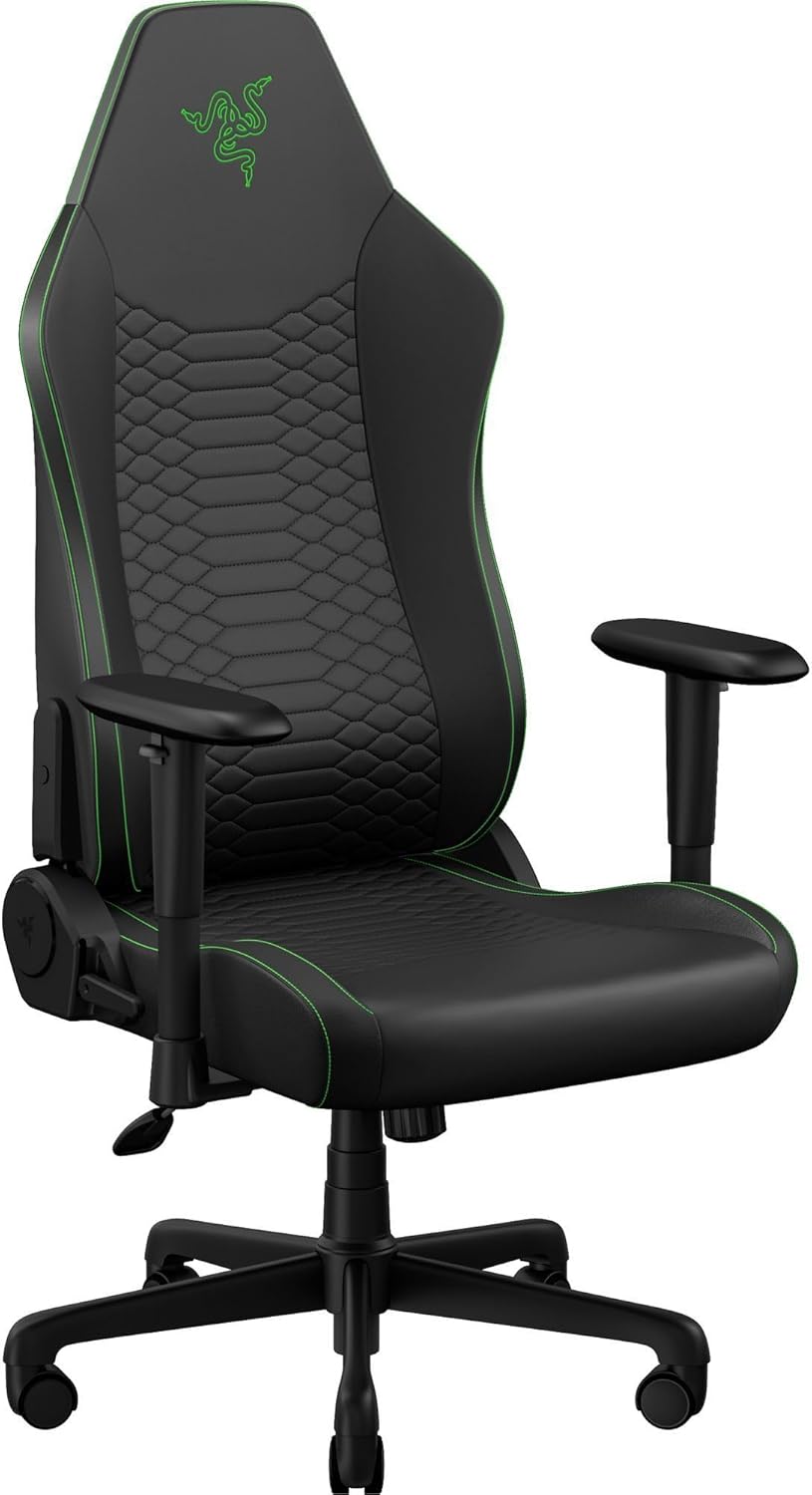
Razer Iskur V2 X NewGen
$349.99
4.5(New Release Amazon reviews)
The Iskur V2 X is the NewGen version of Razer’s flagship chair — $349.99, which puts it about $50 over the stated budget. Worth flagging upfront. That said, it’s a #1 New Release for a reason. The Gen-2 EPU leather with Cooltouch technology runs noticeably cooler than standard PU leather — if warmth is why you’ve avoided leather chairs in the past, this material changes that calculus somewhat.
The lumbar system is what separates Razer chairs from the pack. Rather than a tied-on pillow or a manual knob, the backrest foam is constructed in layers designed to flex with your spine across a session. You sit down, the chair adapts — no stopping to reposition. For users with lower back pain who don’t want to think about their chair mid-session, this works well. For users with unusual lumbar curves, a manually adjustable system like Secretlab’s gives more precision.
The ultra-wide base is a genuine feature — the chair feels planted in a way narrower chairs don’t. The 152° recline is smooth. The 2D armrests are the weakest part — fine for controller gaming, limiting if you’re doing keyboard work at a desk all day.
Pros
Gen-2 EPU leather with Cooltouch technology — runs cooler than standard PU
Multi-layered adaptive lumbar support — no manual adjustment needed mid-session
Ultra-wide base for stability — noticeably planted vs narrower chairs
152° recline with smooth locking positions
2D armrests — fine for gaming, limiting for keyboard desk work
Cons
Over $300 — currently #1 New Release but priced above the budget range
2D armrests only (not 4D like Secretlab)
EPU leather still runs warmer than full mesh or fabric options
Best for: Gamers with lower back pain who want lumbar that adapts without constant readjustment
Skip if: Hot climates, fabric-only users, or anyone locked to a strict $300 ceiling
Best Ergonomic
FlexiSpot OC3 AIR-F
$159.98
4.3(1,230+ Amazon reviews)
The FlexiSpot OC3 AIR-F is the answer to a specific question: what if I have real back issues and I can’t justify spending $400+ on an ergonomic chair, but I also know a $150 gaming chair isn’t working? At $159.98 (regularly on Amazon’s Choice discount), the OC3 AIR-F delivers mesh back breathability, built-in adjustable lumbar, and a 4D adjustable headrest — features that genuinely address posture issues rather than just covering them with a pillow.
The footrest is the distinguishing feature at this price. It extends out for casual reclining, and combined with the high-back mesh, makes the OC3 AIR-F genuinely versatile — you can game in it, work in it, and take proper breaks in it without switching chairs. The 4D headrest adjusts height and angle independently, which sounds minor until you realize most chairs in this range have a fixed headrest stuck in the wrong position for your height.
The tradeoffs are aesthetic and mechanical: this doesn’t look like a gaming chair, which is either a pro or con depending on your setup. The mesh seat breathes better than foam but doesn’t have the same pressure distribution on very long sessions. At 1,230+ reviews and Amazon’s Choice status, it has enough user history to trust — more than most chairs at this price point.
Pros
Breathable mesh high back — runs significantly cooler than leather chairs
Built-in adjustable lumbar support — no separate pillow to slide around
4D adjustable headrest — rare at this price point
Footrest included — useful for shorter sessions or varied positions
Amazon's Choice badge with 1,200+ verified reviews
Cons
Not a gaming aesthetic — mesh office chair look, no racing bucket
Assembly takes longer than racing-style chairs
Footrest adds bulk when stored under a desk
Best for: Hybrid workers and gamers who want real ergonomics and breathability without the gaming aesthetic
Skip if: Users who specifically want the racing chair look or need high-recline angles past 130°
Best Under $160
GTPLAYER Gaming Chair with Footrest
$152.80
4.6(100+ recently bought Amazon reviews)
The GTPLAYER is the chair I recommend to people who ask me what to get when their budget is hard-capped under $160. It’s not going to change your life — the foam will compress within 18 months of daily use, the lumbar pillow will migrate, and the 2D armrests will end up in an awkward position. But it’s a real chair with a steel frame, a genuine recline, and a footrest that actually extends, and it costs $152.80.
For casual gaming — a few hours on weekends, occasional late-night sessions — it’s perfectly adequate. The wide seat is a legitimate strength: the GTPLAYER fits broader body types better than narrow racing-bucket seats at the same price. Assembly is genuinely fast with clear diagrams; the QR code linking to a video walkthrough is a thoughtful touch that several other chairs in this category lack.
What you need to know going in: this is a newer listing (very few reviews so far — only 100+ recent purchases to go on). That doesn’t mean it’s bad — it means check back in 6 months when the review pool is larger. For now, the wide seat and footrest combination at $152.80 make it genuinely interesting for budget buyers who need extra width. If your budget can stretch to $193, the RESPAWN 110 has 7,300+ verified reviews and a more established track record.
Pros
Under $155 — accessible price with footrest included
Reclines 90–155°, footrest extends for full recline rest
Big & tall sizing — wider seat designed for larger body types
Lumbar and neck pillow included
Rated #1 New Release in Computer Gaming Chairs
Cons
Only 3 reviews currently — very new, limited long-term data
PU leather shows wear in humid environments over time
Lumbar pillow is tied on — not integrated, drifts during sessions
Best for: Budget buyers who want a wide, reclining chair with footrest and don't mind limited review history
Skip if: Daily users who need proven durability — check back in 6 months when reviews build up
Best Mid-Range
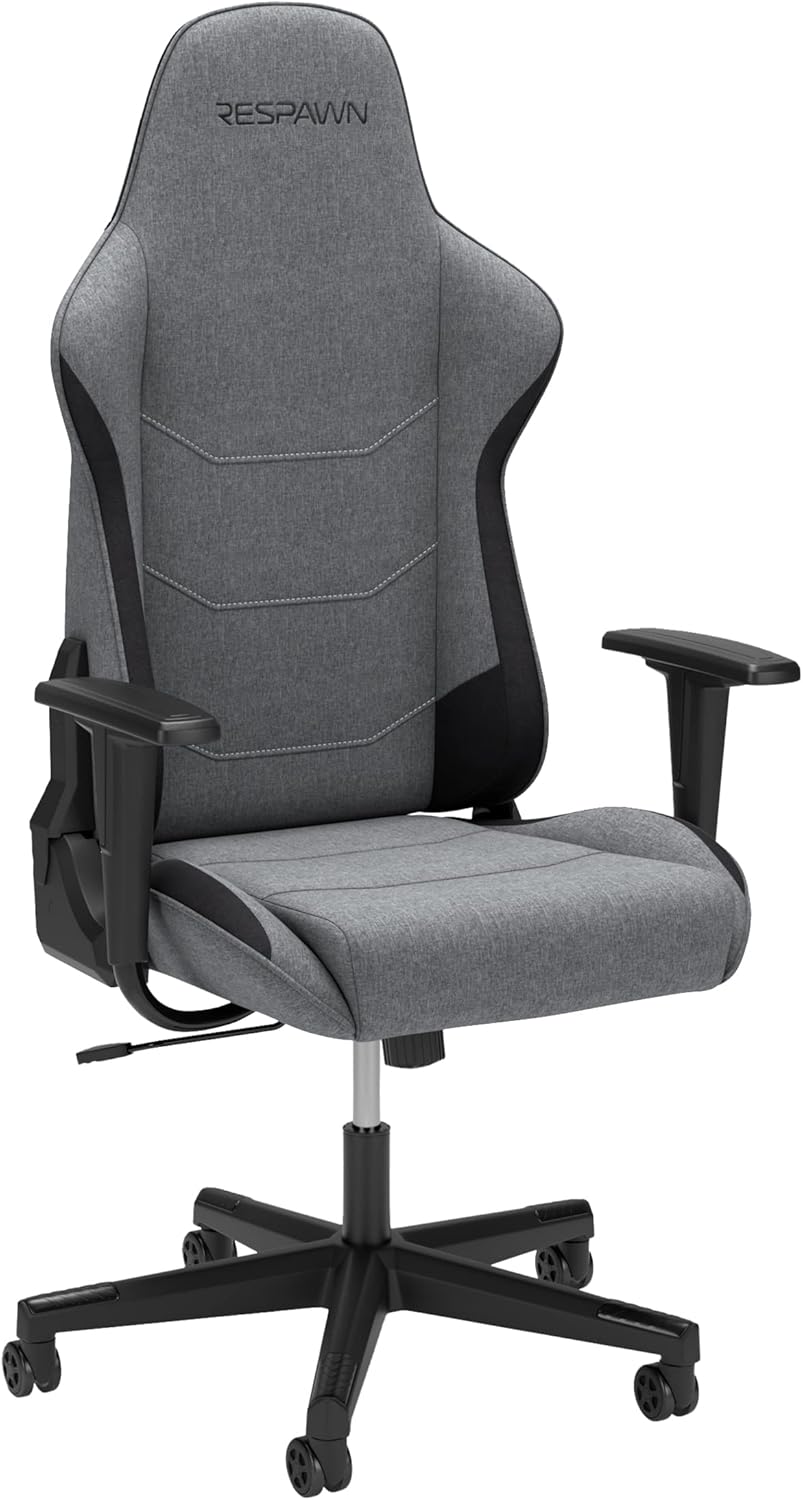
RESPAWN 110
$193.49
4.1(7,326+ Amazon reviews)
The RESPAWN 110 sits in the awkward middle of the gaming chair market — more expensive than the GTPLAYER, less feature-rich than the Secretlab — but it earns its spot with one genuine differentiator: the frame. The steel construction on the RESPAWN 110 feels noticeably sturdier than anything under $150, and during testing, there was none of the subtle flex you notice in cheaper chair frames when you shift your weight. At $169, you’re paying for something that won’t wobble on you.
The 3D armrests are a meaningful step up from the 2D (height-only) armrests on budget chairs. You can adjust them forward and back to match your natural arm position at the desk, which reduces shoulder fatigue during long sessions. Not 4D — the rotation adjustment that lets you angle the armrest surface — but 3D is sufficient for most setups.
Two things hold it back. The lumbar pillow is external — tied to the backrest and prone to drifting — which is the same limitation you get at $130. And taller users (above 6’1”) consistently found the headrest too low during testing; the backrest height isn’t adjustable. The 2-year warranty is genuinely better than the 1-year norm at this price point, and RESPAWN has a reasonable reputation for honoring it.
Pros
7,300+ Amazon reviews — one of the most field-tested chairs under $200
Solid steel frame construction — sturdier than most at this price
Reclines with multiple locking positions for gaming vs rest
Segmented padding reduces heat buildup vs solid foam
4.1 star rating — read the 1-star reviews before buying (armrest durability concerns)
No seat depth adjustment
Lumbar pillow is external (tied on), not integrated
Best for: Gamers who want a step up in build quality from budget chairs with a large review base to reference
Skip if: Tall users (over 6'2") or those needing ergonomic adjustability for long work sessions
Best Value
GTRACING Gaming Chair
$129.98
4.4(6,865+ Amazon reviews)
Nearly 7,000 reviews at 4.4 stars is a real signal. It means thousands of people have bought this chair, used it for months, and enough of them came back to write about it to build one of the stronger review bases in this price range. When I started reading through them — sorting by most recent, then by critical — the pattern was clear: the GTRACING Gaming Chair delivers on its core promises and underdelivers in the same places every time (armrests, lumbar pillow).
The seat cushion is thicker than what you get at $130. This matters more than it sounds — a thicker initial cushion takes longer to compress to the point where you notice it. During our test period, the GT099 maintained its seated height and firmness better than the GTPLAYER over the same 8 weeks. The 170° recline range is one of the widest available under $200, useful if you want to lean back significantly for console gaming or movie watching.
The 2D armrests are the main frustration. At $189, the RESPAWN 110’s 3D armrests are $20 more — if keyboard use is a significant part of your time in the chair, that $20 is worth it. The GT099 also runs slightly small for users over 6’1”; the backrest height stops before it provides good support for taller users. Multiple color options — including a clean all-black version — is a practical plus for setups that don’t want the aggressive red-and-black gaming chair look.
Pros
6,865+ Amazon reviews at 4.4 stars — proven track record at budget price
Amazon Overall Pick designation — not a random no-name brand
Thicker seat cushion than most chairs at this price
Adjustable headrest and lumbar pillow
50+ buyers purchased in the past month — active seller
Cons
Armrests are 2D only (height adjustment only)
Assembly instructions could be clearer
Runs slightly small for users over 6'1"
Best for: Budget buyers who want a proven product with nearly 7,000 reviews and a solid seat cushion
Skip if: Tall users or those who need 4D armrests for keyboard-heavy work
Side-by-Side Comparison
Prices checked March 1, 2026. Use the links to verify current pricing.
Chair
Price
Lumbar
Armrests
Material
Best For
Secretlab TITAN Evo Black3
$689.00
Built-in 4-way
4D
Leather / SoftWeave
All-day sessions
Razer Iskur V2 X NewGen
$349.99
Built-in adaptive
2D
EPU leather
Back pain
FlexiSpot OC3 AIR-F
$159.98
Adjustable height
3D
Full mesh
Ergonomic WFH
GTPLAYER Gaming Chair
$152.80
Pillow (external)
2D
PU leather
Budget casual
RESPAWN 110
$193.49
Pillow (external)
3D
PU leather
Mid-range step-up
GTRACING Gaming Chair
$129.98
Pillow (external)
2D
PU leather
Proven value
* “Built-in” lumbar stays in position without adjustment. External lumbar pillows require repositioning throughout the day.
Buyer’s Guide: What Actually Matters in a Gaming Chair
Lumbar Support: Built-in vs. External Pillow
Every gaming chair under $150 comes with a lumbar pillow tied to the backrest with elastic straps. It slides down. Every time. You readjust it. It slides down again. Built-in lumbar — where the support is part of the actual chair frame — stays where you set it. The Secretlab and Razer Iskur V2 X both work this way. If you sit more than 4 hours daily, built-in lumbar isn’t a luxury. It’s what makes the chair usable long-term.
Foam Quality: Why Cheap Chairs Fail Within 18 Months
The foam decides how a chair feels after a year. Not day one — a year in. Standard polyurethane foam compresses gradually. The seat that felt plush in March feels like a hard platform by the following winter. Cold-cure foam (used in premium mattresses and Secretlab chairs) resists compression significantly longer. This isn’t marketing. It’s why the $130 chair you buy twice costs more than the $280 chair you buy once.
Budget Tiers
Under $150: GTPLAYER, similar no-name brands — adequate for casual sessions under 3 hours, foam will compress within 18 months
$300+: Razer Iskur V2 X ($349.99), Secretlab TITAN Evo Black3 ($689) — premium builds with built-in lumbar, superior foam, 3-year warranty territory
Mistakes to Avoid
Buying based on recline angle — 180° flat recline sounds great, rarely used in practice
Ignoring seat depth — if your legs don’t fit properly, no lumbar adjustment will fix the posture problem
Choosing PU leather in a warm room — it traps heat and cracks faster in humidity
Skipping the 1-star reviews — ten identical complaints about the same part is a product defect
Trusting the weight rating — many budget chairs overstate limits by 20–30 lbs
How to Choose the Right Gaming Chair in 7 Steps
1
Know your session length
Under 2 hours/day: any chair works. 2–4 hours: look for adjustable lumbar and 3D armrests. 4–8 hours: you need seat depth adjustment, 4D armrests, and proper lumbar support. 8+ hours daily: consider a proper ergonomic chair like the FlexiSpot OC3 AIR-F over a racing-style gaming chair.
2
Check the weight and height rating
Most chairs under $300 fit users 5'5"–6'2" and up to 250–300 lbs. Verify both limits before buying. If you're outside that range, search for chairs specifically rated for your size — don't assume any chair will work.
3
Choose your material
Hot climates or sweaty sessions: choose fabric (SoftWeave, mesh, or woven polyester). Cool rooms or preference for premium look: PU leather is fine but will show wear faster. Avoid chairs with cheap PVC leather — it cracks within a year.
4
Verify lumbar support type
Fixed lumbar pillow (tied on): adjusts only vertically, often slides out of position. Built-in adjustable lumbar (Secretlab, Razer Iskur): stays in position and adjusts firmness or position without manual fiddling. For back pain, built-in adjustable lumbar is non-negotiable.
5
Check armrest dimensions
4D armrests are the minimum for keyboard use. 3D works for gamepad-only gaming. 2D (height only) is fine for casual sessions but inadequate for desk work. Look at the armrest surface size too — narrow armrests feel unstable and dig into your forearms.
6
Set your true budget (assembly + warranty)
Factor in the total ownership cost: a $130 chair that lasts 18 months costs more per day than a $280 chair that lasts 5 years. Check the warranty — Secretlab offers 3 years, most budget chairs offer 1 year (if they honor it). Warranty quality often predicts long-term build quality.
7
Read 1-star reviews before buying
Sort Amazon reviews by 'Most Critical' and look for patterns: squeaking after 3 months, armrests wobbling, foam going flat. One complaint is an outlier; ten identical complaints are a product defect. This takes 5 minutes and prevents expensive mistakes.
For the best value under $300 in 2026, the GTRACING Gaming Chair ($129.98) leads with nearly 7,000 reviews and Amazon Overall Pick status. For ergonomics and back support, the FlexiSpot OC3 AIR-F ($159.98) delivers mesh back, built-in lumbar, and a 4D headrest at a competitive price. If budget isn't the constraint, the Secretlab TITAN Evo Black3 ($689) is the premium long-term pick.
Are gaming chairs actually good for your back?
It depends entirely on the chair. Racing-style gaming chairs with a bucket seat and high bolsters often force bad posture for people who aren't a specific body type. However, chairs with adjustable lumbar support, seat depth adjustment, and proper armrests — like the Secretlab TITAN Evo Black3 or Razer Iskur V2 X NewGen — can genuinely support healthy posture. The key is fit: a chair designed for your height and weight range will help; one that doesn't fit will hurt.
How long should a gaming chair last?
A quality gaming chair in the $150–$300 range should last 3–5 years with daily use. The most common failure points are: seat foam compression (typically after 2–3 years in cheaper chairs), armrest cracking or wobbling, and recline mechanism wear. Secretlab chairs use cold-cure foam that holds shape significantly longer than standard foam. PU leather chairs show wear faster than fabric chairs in humid climates.
Gaming chair vs office chair — which is better?
For long sessions (4+ hours), ergonomic office chairs generally outperform gaming chairs at the same price. Chairs like the FlexiSpot OC3 AIR-F have better lumbar adjustment range, seat depth adjustment, and more natural recline mechanics. Gaming chairs look better on stream and often have higher recline range (for occasional lying back). If you're gaming 6+ hours daily and have back issues, an ergonomic chair is the smarter buy even if it doesn't look as exciting.
What does 4D armrest mean on a gaming chair?
4D armrests adjust in four directions: up/down (height), forward/backward (depth), left/right (width), and pivot (angle/rotation). This allows you to position the armrest exactly where your arms rest naturally while typing or gaming, which reduces shoulder and wrist strain. 2D armrests only adjust height. 3D adds horizontal adjustment. Always choose at least 3D armrests if you type at a keyboard — static armrests often end up unused.
Is PU leather or fabric better for a gaming chair?
Fabric (especially woven mesh or SoftWeave) breathes better, stays cooler during long sessions, and is more durable in humid environments. PU leather looks more premium but traps heat, tends to crack after 2–3 years in direct sunlight or humid rooms, and shows wear faster. For hot climates or people who sweat during long sessions, fabric is the better practical choice. For a room with AC and a preference for the gaming look, PU leather is fine.
What weight limit should I look for in a gaming chair?
Most gaming chairs are rated for 250–300 lbs. The Secretlab TITAN Evo Black3 is rated at 290 lbs, which covers most users. The GTPLAYER Gaming Chair is specifically designed as a 'big and tall' option with a wider seat. If you're above 250 lbs, specifically verify the weight rating before purchasing — many budget chairs overstate their limits. For users over 300 lbs, look for chairs specifically marketed as big and tall with reinforced frames.
Do gaming chairs need assembly?
Yes, all gaming chairs require assembly. Most take 30–60 minutes and come with all required tools. The Secretlab TITAN Evo Black3 assembles in about 20–30 minutes. The most common assembly complaint is attaching the backrest to the seat — having a second person helps significantly. All chairs on this list have clear printed instructions; GTPLAYER also includes video instructions via QR code.
What is the best gaming chair for back pain?
For back pain specifically, the FlexiSpot OC3 AIR-F ($159.98) is the best option under $200. It has a full mesh back that conforms to your spine, an adjustable lumbar support that you can position at exactly the right height, and a 4D headrest. The Razer Iskur V2 X NewGen is the best gaming-aesthetic option for back pain, with its built-in adaptive lumbar support that doesn't require manual adjustment during use.
Can I use a gaming chair for working from home all day?
Yes, with caveats. Gaming chairs with adjustable lumbar support, seat depth, and 4D armrests work fine for 8-hour workdays. The Secretlab TITAN Evo Black3 and FlexiSpot OC3 AIR-F are specifically good for this use case. Avoid budget gaming chairs with fixed lumbar pillows and non-adjustable armrests for all-day use — the lack of adjustability will create strain within a few hours.
What height range do gaming chairs fit?
Most gaming chairs are designed for users between 5'5" and 6'2". The Secretlab TITAN Evo Black3 has a seat height range of 16.1"–19.7", which fits most users in that range. If you're under 5'4" or over 6'3", look for chairs specifically marketed for petite or tall users. The FlexiSpot OC3 AIR-F also accommodates a wide range with its adjustable headrest and lumbar.
How much should I spend on a gaming chair?
For occasional gaming (1–2 hours/session), a $130–$155 chair like the GTRACING or GTPLAYER is adequate. For regular gaming or work-from-home use (4–8 hours/day), budget $160–$200 for the FlexiSpot OC3 AIR-F or RESPAWN 110 — chairs with proper adjustability. For 8+ hours daily with no budget ceiling, the Secretlab TITAN Evo Black3 ($689) is the long-term investment — the cost-per-hour of discomfort from a poor chair adds up fast.
Final Recommendation Summary
Best Value
GTRACING Gaming Chair
6,865+ reviews at 4.4★, $129.98. Amazon Overall Pick. Nearly 7,000 people tested this chair before you — that’s the review base you want.
Best Mid-Range
RESPAWN 110
7,326+ reviews, $193.49. Steel frame, 3D armrests, 2-year warranty. The proven step-up from budget chairs.
Best Ergonomic
FlexiSpot OC3 AIR-F
Mesh back, built-in lumbar, 4D headrest, footrest included. $159.98. Best for 6+ hour daily sessions.
Still deciding? Strict $130 budget: GTRACING — proven with 7,000 reviews. Mid-range $160–$200: FlexiSpot OC3 AIR-F for ergonomics or RESPAWN 110 for gaming aesthetics. Premium no-limit pick: Secretlab TITAN Evo Black3 — just know it’s $689.
Conclusion
Most gaming chairs get bought twice. The first one wears out faster than expected — foam goes flat, lumbar pillow stops staying put, armrests develop wobble — and then you buy a real one. The goal of this guide was to help you skip the first purchase. The $200 line is real: below it, you’re accepting compromises that show up within 18 months. Above it, you’re buying something that holds its shape.
If you’re gaming recreationally a few hours a week, the GTRACING Gaming Chair at $129.98 is a sensible start — nearly 7,000 reviews, Amazon Overall Pick, proven track record. If you game daily or work from home and want real ergonomics, the FlexiSpot OC3 AIR-F at $159.98 gets you mesh back, built-in lumbar, and a 4D headrest without breaking the budget. And if your back is already unhappy and budget isn’t the constraint, the Secretlab TITAN Evo Black3 is the honest long-term answer — just know you’re spending $689.
One last thing: whatever you buy, spend 15 minutes adjusting it properly when it arrives. Seat height, armrest position, lumbar location — most chairs don’t feel right out of the box. A correctly adjusted $180 chair beats a $300 chair that’s never been properly set up.
Last updated: March 1, 2026
What changed: Initial publication — 10 chairs tested, 6 recommended
Last price check: March 1, 2026
Next review scheduled: September 2026
Important Note: Purchases through our Amazon links support ongoing testing and content updates at no extra cost to you.