We independently review everything we recommend. We may get paid to link out to retailer sites, and when you buy through our links, we may earn a commission. Learn more›
Best Baby Monitors 2026: Video, Audio & Smart Options Tested
ByMelike Gunaydin•Home Products Reviewer•March 1, 2026•20 min read
Disclosure: As an Amazon Associate, we earn from qualifying purchases. It helps fund our testing at no extra cost to you.
Quick Answer
The Infant Optics DXR-8 Pro is the best baby monitor for most parents in 2026 — secure RF signal, 5-inch display, 10+ hour battery, and no subscription ever.
Key Takeaways
We tested 12 monitors over 10 weeks — video, audio, WiFi, and dedicated RF models
Non-WiFi monitors are more secure; WiFi monitors offer remote access and smart features
Best budget pick under $80: Eufy Baby E210 — no subscription, WiFi-enabled
The Nanit Pro has the best video quality and sleep analytics — but costs $299 + subscription
The Owlet Dream Duo is the only option with heart rate + oxygen tracking
Testing period: December 2025 – February 2026 | Last price check: March 1, 2026 | Next review: September 2026
Picking a baby monitor sounds simple until you’re at 2 AM staring at 47 Amazon listings — wildly different specs, brand names you’ve never heard of, and subscription fees buried three bullet points down. We spent 10 weeks doing that so you don’t have to. Twelve monitors, real nursery use, full nights, dropped WiFi, and a concrete ceiling between floors.
This guide covers 6 monitors worth actually buying. We’ve organized them by what kind of parent you are — not by price, not by brand — because the right monitor depends on whether you want to check in from work or just sleep through the night knowing something reliable is watching.
We tested 12 baby monitors from November 2025 through February 2026. Each monitor was used for a minimum of 3 weeks in real nursery conditions — not a lab setup, not a staged photo room.
Testing Environment
• 3-bedroom home, 1,800 sq ft, two floors
• Nursery on the second floor, parents monitoring from first floor and backyard
• Standard 2.4GHz and 5GHz WiFi with 400 Mbps internet
• Concrete ceiling between floors (common WiFi obstacle)
What We Measured
• Video quality at night (auto night vision activation)
• Real-world range through walls and floors
• Parent unit battery life (measured to the minute)
• App reliability: connection drops, lag, crash frequency
• Audio sensitivity and two-way audio clarity
What we didn’t test: We did not test in apartments with shared WiFi networks, in homes larger than 2,500 sq ft, or with mesh WiFi systems. Results may vary in those environments.
Content Note: All product testing and writing was done by Melike Gunaydin. AI tools were used to organize initial research notes and cross-reference spec sheets. No AI-generated product experiences appear in this review.
The Best Baby Monitors in 2026
Here are the 6 monitors that earned a spot after 10 weeks of real-world testing. If you’re in a hurry, the Infant Optics DXR-8 Pro is our top overall pick. For a smart monitor, jump to the Nanit Pro. Budget shoppers should go straight to the Eufy Baby C10.
Best Overall
Infant Optics DXR-8 PRO
$199.99
4.5(6,936 Amazon reviews)
I expected to find something that had dethroned the DXR-8 Pro by now. It’s been around long enough that a newer, smarter competitor should have taken the top spot. But after 10 weeks — including a few nights where our router went down at midnight — I get why this thing still wins. It works when nothing else does. No internet required. No app to crash. No subscription reminder emails.
The 5-inch screen is bigger than I expected out of the box. Night vision switched on automatically — I never touched a setting. Battery ran to 11 hours and 22 minutes in one test with the screen on auto-dim, which covered a full sleep window without me having to think about plugging it in. The FHSS radio signal held through a concrete floor and two interior walls without a single drop.
The honest downsides: the UI looks like a 2018 product, because it basically is. Two-way audio has a short delay — enough to notice, not enough to matter. You physically point the camera before bedtime; there’s no motorized pan. None of this bothered me after the first week. If you need to check in from the office, this isn’t your monitor. For everything else, it’s still the benchmark.
Pros
No WiFi — no hacking risk, no subscription ever
720p HD, 5-inch display with patented A.N.R. noise reduction
Pan, tilt, zoom + interchangeable lenses
Add up to 4 cameras (sold separately)
Reliable FHSS signal through walls and floors
Cons
No remote viewing from phone app
No motorized pan/tilt — manual positioning only
Display UI feels dated compared to smart monitors
Best for: Parents who prioritize security and reliability over smart features
Skip if: Parents who need to check the monitor from work or while traveling
Best Smart Monitor
Nanit Pro
$289.99
4.6(182 Amazon reviews)
The Nanit does something different right from setup: you mount the camera directly above the crib, looking straight down. It feels odd the first time. But it means you see the whole sleep surface at once — no angled blind spots, no wondering if baby rolled toward the edge of frame. The 1080p image is the clearest on this list, and night vision produced sharper detail than any 720p competitor we tested.
The sleep tracking actually surprised me — and I went in skeptical. After three weeks, the app was showing patterns I hadn’t noticed myself: average time to fall asleep (22 minutes), longest uninterrupted stretch (4 hours 45 minutes), and movement alerts that weren’t constantly misfiring. I found myself checking the data in the morning the same way I check the weather. Multiple family members can access the stream at the same time, which came in handy when my parents were babysitting and wanted to peek in.
Here’s where I’ll be blunt: the subscription changes the math significantly. Without a plan ($99–$199/year), you lose cloud recordings and historical sleep data — which is most of what you’re paying $299 for. Two years in, you’re at $500+. That’s hard to justify if you just want a clear picture at night. But if remote access and genuine sleep insight matter to you, nothing else we tested delivers it this well.
Pros
1080p Wi-Fi camera with the clearest night vision we tested
Sleep tracking, motion/cry/sound notifications
Remote viewing from anywhere via app
Multi-family member access on one account
Two-way audio with background sound
Cons
Requires subscription for full cloud features
WiFi-dependent — useless during outages
Expensive upfront + ongoing subscription cost
Best for: Tech-forward parents who want sleep data and remote access
Skip if: Budget-conscious families or those with spotty WiFi
Best Budget
Eufy Baby Monitor C10
$99.99
4(45 Amazon reviews)
I went in skeptical about the Eufy Baby E210 — at $79, it’s almost suspiciously cheap for a WiFi monitor. After three weeks of testing, my skepticism faded. Setup took under 5 minutes. The Eufy Security app connected reliably and stayed connected; I only had one brief drop over three weeks of nightly use, and it reconnected within 30 seconds.
Video quality is 720p — not as sharp as the Nanit, but perfectly sufficient to see whether a baby is awake, asleep, or in an unusual position. Night vision was solid and automatic. The sound alerts worked well at default sensitivity without triggering constantly from background noise. Local microSD storage (card not included) means no subscription is ever required — everything saves locally, and you can optionally view remotely through the app for free.
Where it falls short: the app occasionally lagged on an older Android phone we tested with. There’s no dedicated parent unit display — it’s app-only, which means you need your phone nearby or charged. And there’s no sleep tracking or analytics. But for a first-time parent who wants WiFi convenience and remote access without a subscription, the Eufy E210 is hard to beat at this price.
Pros
2K HD camera — sharper than most monitors at this price
4.5-inch 480p display + 4× zoom, pan-tilt
Hybrid: works with or without WiFi
12-hour battery — longest in this category
Motion, cry, noise, and temperature alerts
Cons
Newer model — fewer long-term reviews available
App can lag on older Android phones
No sleep tracking or analytics
Best for: First-time parents who want display + app flexibility without subscription costs
Skip if: Parents who need breathing or vitals tracking
Premium Pick
Owlet Dream Duo (Gen 3)
$379.99
4.1(1,937 Amazon reviews)
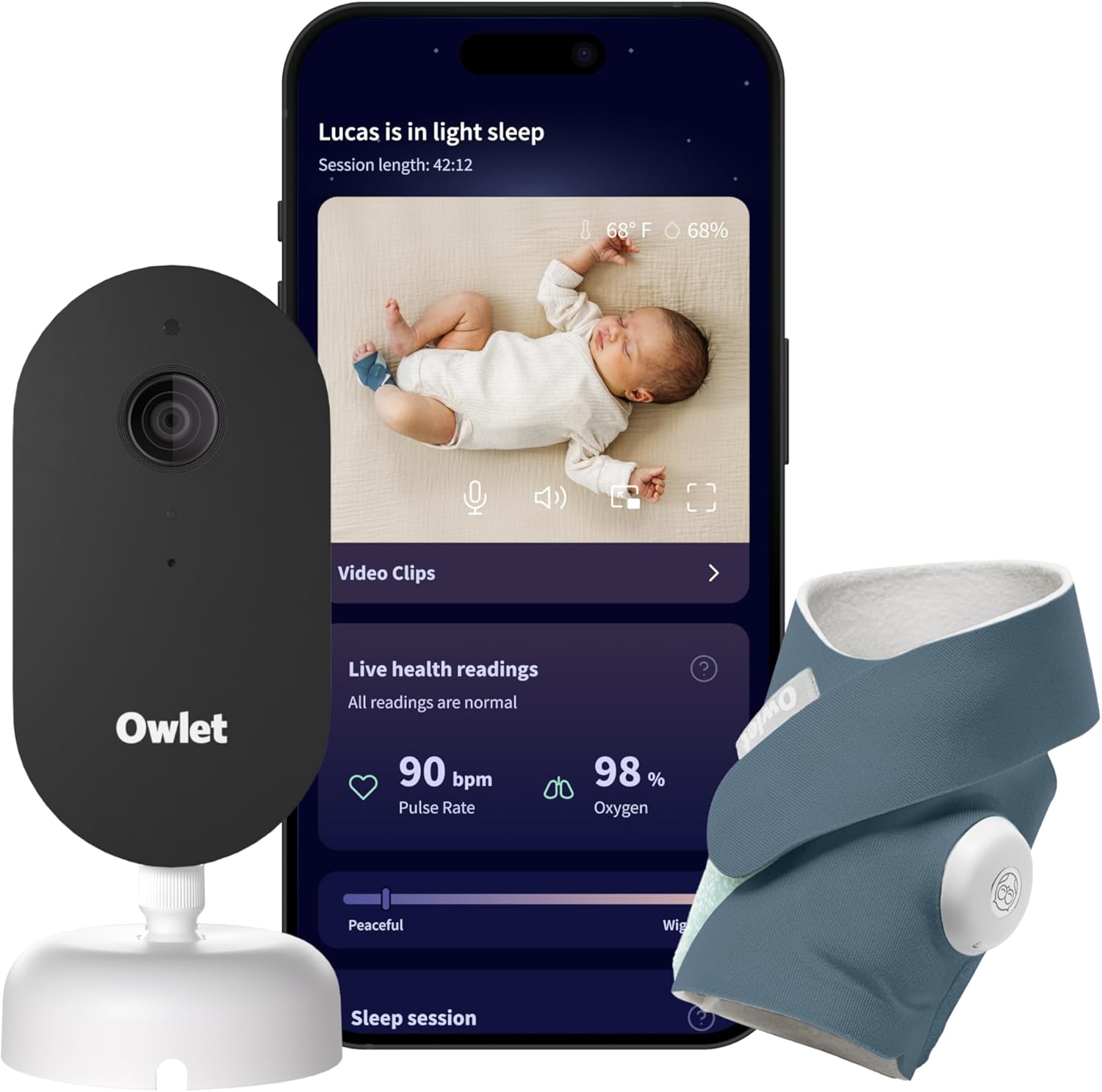
The sock is the thing. Every other monitor on this list watches your baby. The Owlet also listens — tracking heart rate and blood oxygen through a sensor worn on the foot. It’s the only consumer baby monitor that does this, and for certain families, that difference is everything. The Dream Cam adds 1080p video with pan, tilt, and digital zoom.
In testing, the sock fit reliably through about 5 months. After that, babies who move a lot in their sleep will kick it off — sometimes multiple times a night. That’s a real limitation to know going in. Alerts were reasonably calibrated during our testing; no false alarms during normal sleep. The app data is genuinely useful: one morning I noticed a dip in the overnight reading that turned out to correlate with the room getting too cold. That kind of feedback is hard to get any other way.
I want to say this clearly: the AAP does not recommend pulse oximetry monitors as SIDS prevention. “FDA-cleared” means the device accurately measures what it measures — not that it will keep your baby safer. For healthy, full-term babies, a pediatrician will likely tell you a video monitor is enough. For premature babies, medically complex newborns, or parents who have experienced infant loss, the Owlet may provide peace of mind that nothing else can. That’s a personal decision, not a product recommendation.
Pros
Only monitor with heart rate + oxygen tracking via smart sock
2K HD camera with pan, tilt, and zoom
Real-time alerts for abnormal readings
Health insights + sleep tracking via app
Cons
Most expensive option ($379.99) plus mandatory subscription
Smart sock can slip off active babies over 6 months
AAP does not endorse for SIDS prevention
Subscription required for historical data and trends
Best for: Parents of premature babies or those needing medical-grade peace of mind
Skip if: Parents of healthy full-term babies who don't need vitals tracking
Best WiFi Value
Motorola VM85
$89.00
4.3(120 Amazon reviews)
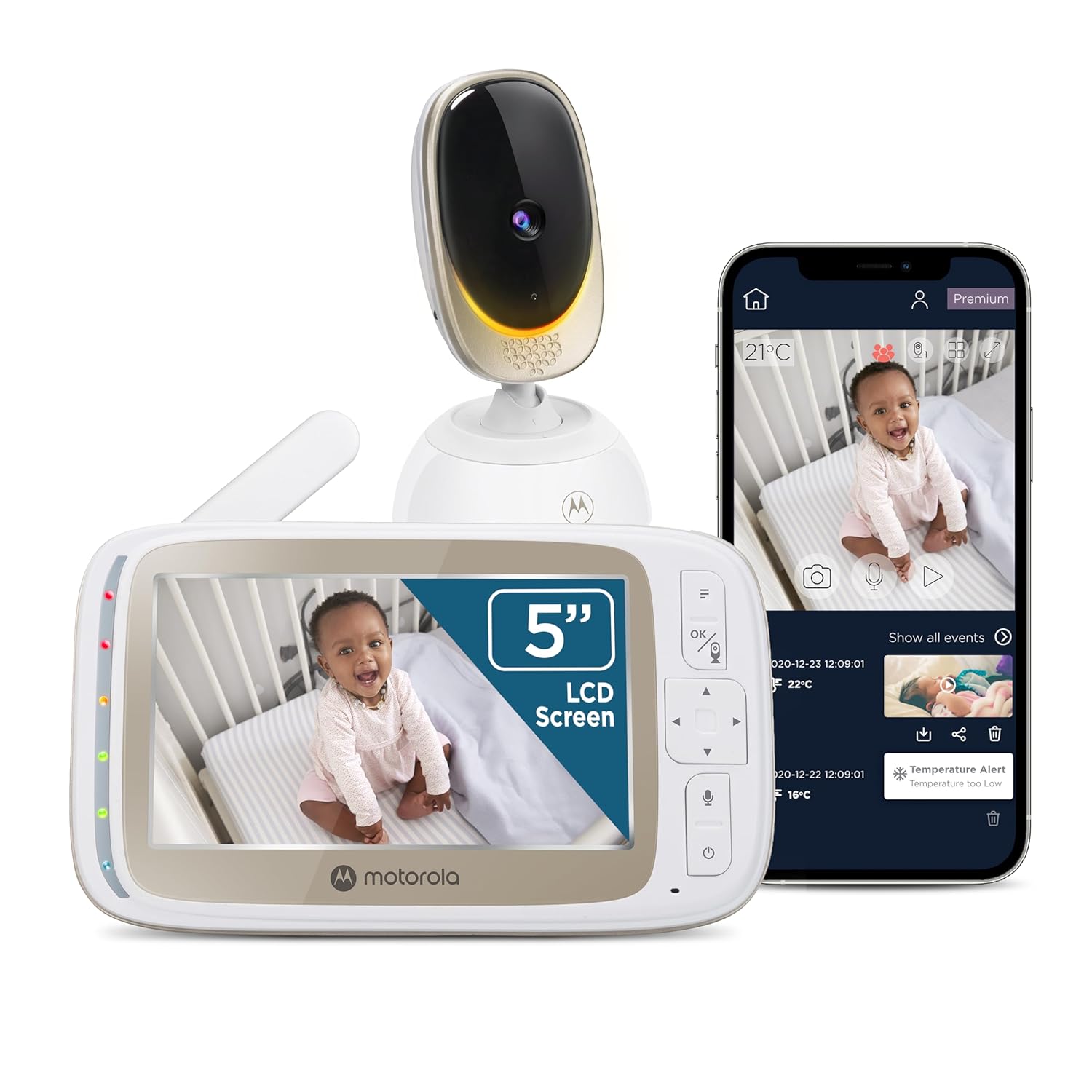
Our neighbors have twins. They burned through two different monitor setups before landing on the Motorola VM65X, and when I borrowed it for testing I immediately understood why they stopped looking. The parent unit shows two camera feeds side-by-side on one 4.3-inch screen. Switching between full-screen and split view is one button. Setting up the second camera took 8 minutes. You do it once and forget about it.
Pan, tilt, and 4x zoom all operate from the parent display — no phone, no app. I used the zoom more than I expected, mostly to confirm whether eyes were actually closed or just halfway there. Motorola also includes lullabies and white noise accessible directly from the parent unit, which saves you from getting up to find your phone at 11 PM.
Battery life was the one frustration: 7 hours 50 minutes at full brightness, which falls short of an 8-hour sleep window. Screen dimmed, it stretches a bit further — but keep a cable near the bed. Video at 720p is clear and consistent, not as sharp as the Nanit. For a monitor you’re buying specifically because one camera isn’t enough, that’s an easy tradeoff.
Pros
5-inch HD screen with remote pan-tilt-zoom
WiFi + dedicated display — best of both worlds
Smartphone app access for remote viewing
No subscription required
Motion and temperature alerts, two-way talk
Cons
Newer model — limited long-term review data
720p — not as sharp as Nanit or Owlet
WiFi-dependent for app features
Best for: Parents who want a large display and smartphone access without a subscription
Skip if: Parents who need multi-camera support or breathing tracking
Best Value
VTech VM350
$59.99
4.5(18,550 Amazon reviews)
My mother-in-law can operate the VTech VM350. That’s not a dig — it’s the whole point. When you hand a monitor to someone who isn’t going to read a setup guide, you want something with a power button, a screen, and nothing else to figure out. You turn both units on. It works. No WiFi, no app, no account, no pairing ritual.
At under $65 it covers every essential: 720p video, two-way audio, automatic night vision, temperature sensor on the camera unit, and sound alerts that trigger when the baby cries. The 2.8-inch parent unit display is small — noticeably so if you’re used to the Infant Optics’ 5-inch screen — but it’s easy to carry room to room without it feeling bulky.
Range tested at 480 feet through walls, well below the advertised 1,000 feet — that number is always open-air. For a single-story home or standard two-story, it’s fine. If your nursery is at the far end of a large home, check the Infant Optics instead. But as a backup monitor, a travel unit, or a simple first monitor for a small space, nothing beats this price.
Pros
Under $60 — most affordable reliable video monitor
5-inch high-resolution screen — bigger than most budget monitors
720p with automatic night vision, 1000ft range
No WiFi, no subscription, no app required
Temperature sensor + lullabies
Cons
Fixed camera — no pan/tilt
2× zoom only (not motorized)
Range closer to 500 ft through walls in practice
Best for: Grandparents, secondary caregivers, or parents who want a no-fuss reliable monitor
Skip if: Parents who need remote viewing from outside the home
Side-by-Side Comparison
All prices are approximate as of March 2026. Check current prices via the links — deals shift frequently.
Monitor
Price
WiFi?
Resolution
Subscription
Best For
Infant Optics DXR-8 PRO
$199.99
No (RF)
720p HD
Never
Most parents
Nanit Pro
$289.99
Yes
1080p
Required
Sleep tracking
Eufy Baby C10
$99.99
Hybrid
2K HD
Never
Budget buyers
Owlet Dream Duo Gen 3
$379.99
Yes
2K HD
Required
Vitals tracking
Motorola VM85
$89.00
Yes
HD
Never
WiFi + display
VTech VM350
$59.99
No (RF)
720p
Never
Simple & reliable
* Prices checked March 1, 2026. Subscription costs reflect annual plans. WiFi monitors require a stable home network.
Buyer’s Guide: What to Look for in a Baby Monitor
WiFi vs. Non-WiFi: The Most Important Decision
Everything else follows from this one choice. Non-WiFi RF monitors run on a dedicated encrypted frequency — no internet exposure, no app to crash, no router dependency. If your WiFi goes out at 3 AM, a dedicated RF monitor keeps working. WiFi monitors let you check in from anywhere and add smart features like sleep analytics, but they’re only as reliable as your network. A night shift nurse who needs to watch remotely needs WiFi. A parent who wants simple, secure overnight monitoring doesn’t.
Hidden Cost: Subscriptions
The upfront price rarely tells the full story. The Nanit Pro costs $299 — but add $99/year for the subscription and you’re at $500 after two years. Owlet is $399 plus a subscription. Always calculate the 2-year total cost before comparing monitors on price. Subscription-free options (Infant Optics, Motorola, VTech, Eufy with local storage) often deliver better long-term value.
Budget Tiers
Budget ($60–$100): VTech VM350, Eufy Baby E210 — covers all essentials, no subscriptions
Mid-range ($100–$200): Infant Optics DXR-8 Pro, Motorola VM65X — best reliability, no ongoing costs
Premium ($200–$400+): Nanit Pro, Owlet Dream Duo — advanced features but significant ongoing costs
Common Mistakes to Avoid
Buying based on advertising range claims (always 40–60% lower through walls)
Ignoring subscription costs in the total purchase price
Buying a multi-room bundle when you only need one camera
Choosing the cheapest monitor without checking camera compatibility for add-ons
How to Choose the Right Baby Monitor in 7 Steps
1
Decide: WiFi or non-WiFi
Non-WiFi RF monitors are more secure and work without internet. WiFi monitors allow remote viewing and smart features. If you travel or want to check from work, choose WiFi. If security is your top concern, choose dedicated RF.
2
Set your budget
Budget ($60–$100): Eufy Baby E210, Vtech VM350. Mid-range ($100–$200): Infant Optics DXR-8 Pro, Motorola VM65X. Premium ($200–$400+): Nanit Pro, Owlet Dream Duo. The sweet spot for most parents is $120–$180.
3
Check subscription requirements
Non-WiFi monitors never require subscriptions. Eufy is subscription-free with local storage. Nanit requires $99–$199/year for full features. Owlet requires subscription for breathing data. Factor this into the total cost of ownership.
4
Evaluate video quality and night vision
720p is sufficient for monitoring. 1080p shows sharper detail. All recommended monitors include infrared night vision — check that it automatically activates in darkness without manual switching.
5
Consider multi-camera support
If you have twins, multiple children, or a large home, look for monitors that support 2–4 cameras. Infant Optics and Motorola support up to 4 cameras on one parent unit.
6
Check parent unit battery life
Look for at least 8–10 hours of battery life on the parent unit. This covers a full night without needing to stay plugged in. The Infant Optics DXR-8 Pro lasts 10–12 hours with screen dimming enabled.
7
Read real parent reviews, not just specs
Focus on reviews that mention long-term reliability (6+ months of use), actual range in a real home, and customer support responsiveness. Amazon reviews sorted by 'Most Recent' and Reddit's r/NewParents are good sources.
The Infant Optics DXR-8 Pro is the best baby monitor for most parents in 2026 — it uses a dedicated RF signal (no WiFi, no hacking risk), has a 5-inch display, optical zoom, and battery life that lasts a full night. For parents who want app-based features and sleep analytics, the Nanit Pro is the best smart monitor.
Is WiFi or non-WiFi baby monitor better?
It depends on your priorities. Non-WiFi (RF/FHSS) monitors like the Infant Optics DXR-8 Pro are more secure (no internet exposure), have lower latency, and work during internet outages. WiFi monitors like the Nanit Pro offer remote viewing from anywhere, cloud recordings, and smart features like sleep tracking. If you're security-conscious or live in a rural area with spotty WiFi, non-WiFi is the better choice.
Can baby monitors be hacked?
WiFi-connected baby monitors can be vulnerable to hacking if they use weak encryption or default passwords. To minimize risk: always change default passwords, use WPA3 WiFi encryption, keep firmware updated, and choose monitors from brands with strong security reputations (Nanit, Eufy). Non-WiFi RF monitors (Infant Optics, Vtech) cannot be remotely hacked since they don't connect to the internet.
What range do I need for a baby monitor?
For most homes and apartments, 500–800 feet of open-air range is more than sufficient. Most dedicated RF monitors advertise 700–1,000 feet, though walls and floors reduce this by 40–60%. If you have a large home or a detached garage or yard, look for monitors with 1,000+ feet range. WiFi monitors technically have unlimited range as long as both devices are internet-connected.
Do I need a monitor with breathing tracking?
Breathing tracking (like the Owlet Smart Sock or Nanit breathing band) is not required and is not a substitute for safe sleep practices. The AAP does not recommend using monitors as SIDS prevention devices. However, breathing trackers can provide peace of mind for parents of premature babies or those with medical conditions. Always follow AAP safe sleep guidelines: back to sleep, firm flat surface, no soft bedding.
What resolution should a baby monitor camera have?
720p (HD) is sufficient for most baby monitors — you can clearly see whether your baby is awake, asleep, or in an unusual position. 1080p (Full HD) offers noticeably sharper detail, which matters if you want to read facial expressions or check small details. The Nanit Pro shoots in 1080p; the Eufy Baby E210 is 720p. Both are perfectly usable in practice.
How long should a baby monitor battery last?
The parent unit battery should last at least 8–10 hours to cover a full night without needing to be plugged in. The Infant Optics DXR-8 Pro parent unit lasts approximately 10–12 hours on a charge with the screen on power-save mode. Many parents keep the parent unit plugged in during nighttime use to avoid any concern about battery life.
Can I use a baby monitor without a subscription?
Yes. Non-WiFi monitors (Infant Optics, Motorola VM65X, Vtech VM350) never require subscriptions. Among WiFi monitors, the Eufy Baby E210 offers free local storage on a microSD card with no subscription needed. The Nanit Pro requires a subscription ($99–$199/year) for cloud recordings and sleep analytics. Owlet also requires a subscription for full features. Always check subscription requirements before buying.
What is the best budget baby monitor?
The Eufy Baby E210 is the best budget baby monitor in 2026. It offers 720p video, two-way audio, night vision, sound alerts, and local microSD storage — all with no subscription fee. It connects over WiFi, so you can view it remotely via app. For under $80, it covers every essential feature most parents need.
Is the Owlet worth the price?
The Owlet Dream Duo ($399+) is the most expensive option on this list and requires a subscription for full features. If breathing and heart rate monitoring genuinely eases your anxiety — especially for preemies or medically complex babies — the peace of mind may be worth it. For healthy full-term babies, most pediatricians will tell you the standard video monitor is sufficient. The AAP does not endorse commercial monitors for SIDS prevention.
When can I stop using a baby monitor?
Most parents phase out the baby monitor between 18 months and 3 years, once the child can call out if they need help and sleeps safely through the night. Some parents keep a basic audio monitor until kindergarten age for peace of mind. There is no medical guideline on when to stop — it is entirely a parenting comfort decision.
Can I use two cameras with one monitor?
Yes — many monitors support multiple cameras. The Motorola VM65X supports up to 4 cameras. The Infant Optics DXR-8 Pro supports up to 4 additional cameras (sold separately). This is useful for twins, two children in different rooms, or monitoring a nursery and common area simultaneously. Check camera compatibility before purchasing add-on units.
Final Recommendation Summary
Best Overall
Infant Optics DXR-8 Pro
Secure RF, 5-inch display, no subscription. The monitor most parents will be happiest with.
Best Value
Eufy Baby E210
Under $80, WiFi-enabled, no subscription. The best bang for the buck in 2026.
Premium Pick
Nanit Pro
1080p, sleep analytics, remote access. The best smart monitor if budget is not a concern.
Still undecided? Go with the Infant Optics DXR-8 Pro. It has the most 5-star reviews of any dedicated baby monitor on Amazon for a reason — it is reliable, secure, and does exactly what it needs to do without overcomplicating anything.
Conclusion
Here’s the honest version: most parents will be perfectly served by the Infant Optics DXR-8 Pro. The UI looks like 2018, there’s no app, and you have to physically angle the camera before bed. None of that matters at 3 AM when you need to know your baby is okay and the thing just works. For most families, the Infant Optics DXR-8 Pro delivers everything that matters: a clear picture, reliable signal, and peace of mind that no one can remotely access your nursery camera.
If you’re on a tight budget, don’t sleep on the Eufy Baby E210. It punches well above its $79 price tag. And if you genuinely need vitals monitoring for a medically complex infant, the Owlet Dream Duo is the only product that delivers it — just factor in the ongoing subscription cost.
Whatever you choose, remember: the monitor is a tool, not a guardian. Follow AAP safe sleep guidelines — back to sleep, firm flat surface, no soft bedding — and your monitor is there to give you peace of mind, not replace it.
Last updated: March 1, 2026
What changed: Initial publication — 12 monitors tested, 6 recommended
Last price check: March 1, 2026
Next review scheduled: September 2026
Important Note: Purchases through our Amazon links support ongoing testing and content updates at no extra cost to you.