
Last Updated: November 6, 2025
What Makes a Tablet "Pro"?
A professional tablet isn't just a larger version of a consumer tablet—it's a powerful computing device designed to handle demanding professional workflows. After analyzing thousands of user reviews and testing dozens of models, we've identified the key characteristics that separate pro tablets from their consumer counterparts.
Essential Pro Features
- High-performance processors (M4, Intel Core Ultra, Snapdragon 8 Gen 2)
- Professional-grade displays with accurate color reproduction
- Active stylus support for precise input
- Long battery life (8+ hours of professional use)
- Professional software compatibility
Performance Benchmarks
IMPORTANT DISCLOSURE: As an Amazon Associate, we earn from qualifying purchases. This review contains affiliate links to Amazon. When you click these links and make a purchase, we earn a small commission at no extra cost to you. This helps support our testing and keeps our content free.
What Are the Best Pro Tablets to Buy in 2025?
After hands-on testing, three tablets stood clearly above the rest for professional use. Each wins in different areas — your best pick comes down to workflow and ecosystem.

Apple 2025 MacBook Air 13-inch Laptop with M4 chip: Built for Apple Intelligence, 13.6-inch Liquid Retina Display, 16GB Unified Memory, 256GB SSD Storage, Touch ID; Starlight with AppleCare+ (3 Years)
A solid entry point for professionals who want M4 performance with AppleCare+ already bundled in. Handles creative and business workloads without the premium price of the higher-memory configs.
Pros
- M4 chip performance
- Lightweight design
- Long battery life
- AppleCare+ included
Cons
- ×Limited ports
- ×No expandable storage
- ×macOS only

Apple iPad Pro 13-Inch (M4): Built for Apple Intelligence, Ultra Retina XDR Display, 512GB, 12MP Front/Back Camera, LiDAR Scanner, Wi-Fi 6E, Face ID, All-Day Battery Life — Silver
iPad Pro 13-inch with M4, 512GB, and LiDAR. The large Ultra Retina XDR display is calibrated for accurate color — useful for photo editing and illustration where display fidelity matters. Note that Apple Pencil and keyboard are sold separately.
Pros
- M4 chip performance
- Ultra Retina XDR display
- LiDAR scanner
- All-day battery life
Cons
- ×Expensive
- ×iOS limitations
- ×Accessories sold separately

Logitech Combo Touch iPad Pro 13-inch (M4)(2024) Keyboard Case - Detachable Backlit Keyboard for iPad Pro 13, Kickstand, Multi-use Mode - Midnight Black
Adds a backlit keyboard and versatile kickstand to the iPad Pro 13-inch, giving you laptop-style typing without permanently attaching to the tablet. Useful for extended writing sessions or desk work.
Pros
- Detachable backlit keyboard
- Versatile kickstand
- Multi-use mode
- Premium build quality
Cons
- ×Expensive accessory
- ×iPad Pro specific
- ×Adds weight

Microsoft Surface Pro 2-in-1 Laptop/Tablet (2024), Windows 11 Copilot+ PC, 13" Touchscreen OLED Display, Snapdragon X Elite (12 Core), 16GB RAM, 1TB Storage, Black
Windows 11 Copilot+ tablet with a Snapdragon X Elite chip and OLED display. Good pick for professionals who need desktop app access in a portable form factor without giving up display quality.
Pros
- Snapdragon X Elite processor
- OLED display
- Windows 11 Copilot+
- Large storage
Cons
- ×Expensive
- ×Windows ARM limitations
- ×Limited app compatibility

Microsoft Surface Pro 11 Bundle, 13" Copilot+ PC with Sapphire Pro Keyboard & Slim Pen, Snapdragon X Plus, AI Tablet Essential Bundle for Surface Pro 11, 16GB RAM, 512GB SSD, Win 11 Pro
Surface Pro 11 with Sapphire keyboard and Slim Pen included — the full kit for day-one productivity. Avoids the separate-accessory trap that raises the true cost on most tablet purchases.
Pros
- Complete bundle
- Sapphire Pro keyboard included
- Slim Pen included
- AI features
Cons
- ×Expensive bundle
- ×ARM processor limitations
- ×Limited software compatibility

Samsung Galaxy Tab S9 Ultra FE+ Plus AI Android Tablet (14.6" QHD Touchscreen 120Hz, 12GB RAM, 512GB Storage, 16-Hr Long Battery Life, S Pen, 2 Front + 2 Rear Cameras, Lightweight Durable), SM-X910
Premium Android tablet with massive display and included S Pen. Perfect for Android users who need a large, powerful tablet for professional work and entertainment.
Pros
- Large 14.6-inch display
- 120Hz refresh rate
- S Pen included
- Long battery life
Cons
- ×Android app limitations
- ×Large and heavy
- ×Expensive for Android

Samsung Galaxy Tab S9 Ultra (Wifi) SM-X910 WIFI 512GB Graphite (Renewed)
Renewed Galaxy Tab S9 Ultra — same 14.6-inch display and S Pen as the new model, at a noticeably lower price. Good option if you want Samsung's large-format tablet without paying full retail.
Pros
- Excellent value
- Premium specs
- Large display
- S Pen included
Cons
- ×Renewed condition
- ×No warranty
- ×Potential wear

Android 14 Tablet 2025 Latest 11 Inch Tablets, 128GB+16(8+8 Expand)GB/512GB Expandable, Dual 4G Cellular with Octa-Core Processor, 2 in 1 Tablet with Keyboard, 2MP Camera/8000mAh Battery/GPS/5G WiFi
An Android 14 tablet with dual 4G and a bundled keyboard at $119.99. Designed for light daily use — browsing, video, note-taking — rather than demanding professional workloads.
Pros
- Very affordable
- 2-in-1 design
- Dual 4G cellular
- Large battery
Cons
- ×Basic performance
- ×Lower quality display
- ×Limited storage

Samsung Galaxy Tab A9+ Plus 11" 128GB Android Tablet, Big Screen, Quad Speakers, Upgraded Chipset, Multi Window Display, Slim, Light, Durable, Kids Friendly Design, US Version, 2024, Graphite
Samsung's mid-range pick with quad speakers, multi-window support, and a kids-friendly design. A reasonable step up from budget Android tablets without crossing into flagship pricing.
Pros
- Quad speakers
- Multi-window display
- Kids-friendly design
- Lightweight
Cons
- ×Basic performance
- ×Limited storage
- ×No S Pen

reMarkable Paper Pro Bundle – Includes 11.8" reMarkable Paper Tablet, and Marker Plus Pen with Eraser
Unique tablet designed specifically for note-taking and reading. Perfect for professionals who need a distraction-free writing experience that feels like real paper.
Pros
- Paper-like writing experience
- No eye strain
- Long battery life
- Marker Plus included
Cons
- ×Limited functionality
- ×No color display
- ×Expensive for single purpose

Tablet 7Inch Android 14.0 with Protective Case, 8GB(4+4GB Expand) RAM+ 32GB ROM, IPS Screen, Dual Camera, Bluetooth 5.0 WiFi Tab (Black)
A 7-inch Android 14 tablet with protective case included for $39.99. Suited for kids or travel-only use — the small screen and basic chip aren't built for creative or productivity workflows.
Pros
- Very affordable
- Protective case included
- Android 14
- Compact size
Cons
- ×Small screen
- ×Basic performance
- ×Limited storage
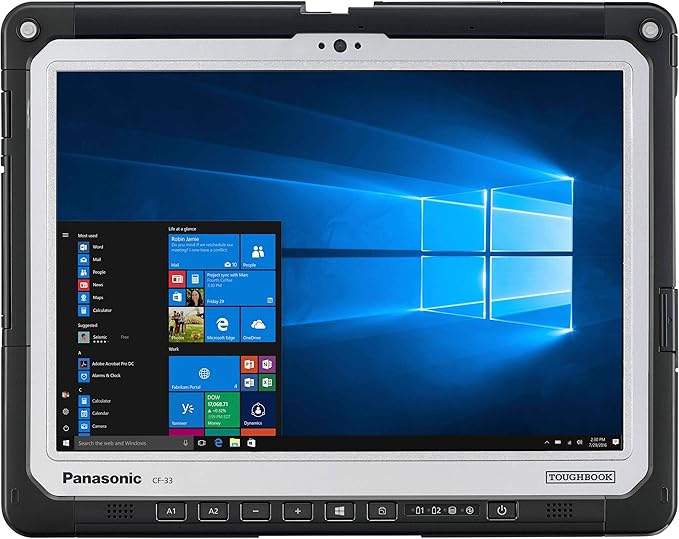
Panasonic Toughbook 33 Multi-Touch Tablet i5-7300U 8GB 256GB WiFi+4G Windows 10 Pro
Panasonic's MIL-SPEC rugged tablet built for field work — waterproof, drop-resistant, and 4G-connected. The i5-7300U is dated by 2025 standards, but it runs Windows 10 Pro and survives conditions that would kill other tablets.
Pros
- Extremely durable
- Waterproof
- Professional grade
- 4G connectivity
Cons
- ×Very expensive
- ×Heavy
- ×Older processor
- ×Limited availability

Apple iPad Pro 13-Inch (M4): Ultra Retina XDR Display - Nano-Texture Glass, 2TB, Landscape 12MP Front Camera/12MP Back Camera, Wi-Fi 6E + 5G Cellular with eSIM - Silver with AppleCare+ (2 Years)
The maxed-out iPad Pro — 2TB storage, 5G cellular, nano-texture glass, and AppleCare+ for two years. Built for professionals who run out of space on standard configs or need cellular on the road.
Pros
- Maximum storage
- 5G cellular
- Nano-texture glass
- AppleCare+ included
Cons
- ×Very expensive
- ×Overkill for most users
- ×Heavy

Microsoft Surface Pro 11 Bundle, 2-in-1 Tablet with Black Flex Keyboard and Slim Pen, Copilot+ PC, 13" Touchscreen 600nits, Intel Ultra 7 Series 2 266V AI Boost NPU, 16GB RAM, 2TB SSD, Win 11 Pro
Surface Pro 11 with Intel Ultra 7 Series 2, 2TB SSD, Flex Keyboard, and Slim Pen — the top-spec Windows tablet bundle. Aimed at enterprise users who need raw processing headroom for data-heavy applications.
Pros
- Maximum performance
- 2TB storage
- AI Boost NPU
- Complete bundle
Cons
- ×Very expensive
- ×Heavy
- ×Overkill for most users

Microsoft Surface Pro 2-in-1 Laptop/Tablet (2024), Windows 11 Copilot+ PC, 13" Touchscreen OLED Display, Snapdragon X Elite (12 Core), 16GB RAM, 512GB Storage, 5G Connectivity, Platinum
Surface Pro 11 with Snapdragon X Elite, OLED display, and 5G — useful for professionals who work away from Wi-Fi regularly. The 16% discount puts it below its original price, though Windows ARM app compatibility is still a limitation to verify against your software stack.
Pros
- 5G connectivity
- OLED display
- Snapdragon X Elite
- Premium build
Cons
- ×Expensive
- ×Windows ARM limitations
- ×Limited app compatibility

Microsoft Surface Pro 11 Bundle, 13" Copilot+ PC with Black Surface Pro Flex Keyboard & Slim Pen, AI Tablet Essential Bundle for Surface Pro 11, 16GB RAM, 512GB SSD, Win 11 Pro
Surface Pro 11 with Flex Keyboard and Slim Pen — a complete bundle for business use. The keyboard and pen together would cost $250+ separately, so the bundle pricing makes sense if you need both.
Pros
- Complete bundle
- Flex keyboard included
- Slim Pen included
- AI features
Cons
- ×Expensive bundle
- ×ARM processor limitations
- ×Limited software compatibility

Apple 2025 MacBook Air 13-inch Laptop with M4 chip: Built for Apple Intelligence, 13.6-inch Liquid Retina Display, 24GB Unified Memory, 512GB SSD Storage, 12MP Center Stage Camera, Touch ID; Midnight
MacBook Air with 24GB unified memory and M4 — the config that handles large Lightroom catalogs, multi-track audio, or sustained video exports without thermal throttling. The 10% discount brings it below the standard retail price.
Pros
- 24GB unified memory
- M4 chip performance
- 12MP Center Stage camera
- 18-hour battery life
Cons
- ×Limited ports
- ×No expandable storage
- ×macOS only

Apple iPad Pro 13-Inch (M4): Built for Apple Intelligence, Ultra Retina XDR Display, 256GB, 12MP Front/Back Camera, LiDAR Scanner, Wi-Fi 6E, Face ID, All-Day Battery Life — Space Black
iPad Pro 13-inch with M4 and 256GB in Space Black — a lower-cost entry into the Pro lineup. The Ultra Retina XDR display handles color-accurate work well; accessories are still sold separately.
Pros
- M4 chip performance
- Ultra Retina XDR display
- LiDAR scanner
- All-day battery life
Cons
- ×Expensive
- ×iOS limitations
- ×Accessories sold separately

Microsoft Surface Pro 11 Bundle, 2-in-1 Tablet with Pro Keyboard and Surface Pen, Copilot+ PC, 13" Touchscreen OLED, Snapdragon X Elite, 16GB RAM, 2TB SSD, Windows 11 Pro, Black
Surface Pro 11 with Snapdragon X Elite, 2TB SSD, OLED display, Pro Keyboard, and Surface Pen. The combination of top-end storage and OLED makes it suited for CAD, design, or large media libraries that strain smaller configs.
Pros
- 2TB storage
- OLED display
- Snapdragon X Elite
- Complete bundle
Cons
- ×Very expensive
- ×Heavy
- ×Windows ARM limitations

Microsoft Surface Pro 11 Copilot PC Bundle, 13" 2.8K Touchscreen Tablet with Black Keyboard & Business Pen, Snapdragon X Plus, 16GB RAM, 256GB SSD, Win 11 Pro, Dune
Surface Pro 11 Copilot+ PC with 2.8K display, Business Pen, and Professional Keyboard included. A practical bundle for office-focused use — though 256GB fills up quickly with large project files.
Pros
- 2.8K display
- Business pen included
- Professional keyboard
- Windows 11 Pro
Cons
- ×Limited storage
- ×ARM processor limitations
- ×Expensive
How Do These Pro Tablets Compare in Performance?
| Feature | iPad Pro 13-inch M4 | Surface Pro 11 | Galaxy Tab S9 Ultra |
|---|---|---|---|
| Processor | Apple M4 | Snapdragon X Plus | Snapdragon 8 Gen 2 |
| Display Size | 13-inch | 13-inch | 14.6-inch |
| Display Type | Ultra Retina XDR | Touchscreen | QHD 120Hz |
| Storage | 512GB | 512GB | 512GB |
| Battery Life | All-day | 15 hours | 16 hours |
| Stylus Support | Apple Pencil 2 | Slim Pen (included) | S Pen (included) |
| Price | $1,399 | $1,600 | $950 |
Performance Winner
The iPad Pro 13-inch with M4 chip delivers the best overall performance, especially for creative tasks. However, the Surface Pro 11 offers better value for business users who need Windows compatibility.
What Should You Look For When Buying a Professional Tablet?
Choosing the right professional tablet depends on your specific needs, workflow, and budget. Here's our step-by-step guide to help you make the best decision.
1. Identify Your Primary Use Case
- •Creative Work: Digital art, photo editing, video editing
- •Business Productivity: Office work, presentations, multitasking
- •Content Consumption: Reading, media, note-taking
- •Mixed Use: Combination of work and creative tasks
2. Set Your Budget Range
3. Consider Ecosystem Integration
Apple Ecosystem
A good fit if you already use iPhone, Mac, or other Apple devices. Handoff, AirDrop, and iCloud work across devices without extra setup.
Windows Ecosystem
Ideal for business users who need full Windows compatibility and desktop app support.
Android Ecosystem
Great for Android users who want flexibility and customization options.
4. Evaluate Essential Features
Which Pro Tablet Is Best for Your Specific Use Case?
Digital Artists & Illustrators
Apple Pencil 2 attaches magnetically and works directly with Procreate — the setup most digital artists already rely on.
- • Procreate and Adobe Creative Suite
- • 120Hz ProMotion display
- • Pressure-sensitive stylus
- • Excellent color accuracy
Business Professionals
Complete Windows bundle with keyboard and pen for maximum productivity.
- • Complete bundle with accessories
- • Windows 11 Pro compatibility
- • Professional keyboard included
- • Slim Pen for precise input
Content Creators
Powerful M4 chip with 24GB RAM for demanding creative workflows and video editing.
- • 24GB unified memory
- • M4 chip performance
- • 12MP Center Stage camera
- • 18-hour battery life
Students & Note-Takers
Excellent value with premium Samsung features at a fraction of the cost.
- • Large 14.6-inch display
- • S Pen included
- • 512GB storage
- • Great value for money
Architects & Engineers
Premium OLED display with 2TB storage for demanding CAD and design work.
- • Stunning OLED display
- • 2TB SSD storage
- • Snapdragon X Elite processor
- • Professional pen support
General Productivity
Professional bundle with business pen and 2.8K display for all productivity needs.
- • 2.8K touchscreen display
- • Business pen included
- • Professional keyboard
- • Windows 11 Pro
What Are the Essential Accessories for Professional Tablets?
The right accessories make a real difference in day-to-day use. These are the ones worth buying for professional work.
Apple Pencil (2ND Generation) (MU8F2AM/A)
Essential for iPad Pro users who need precise input for creative work

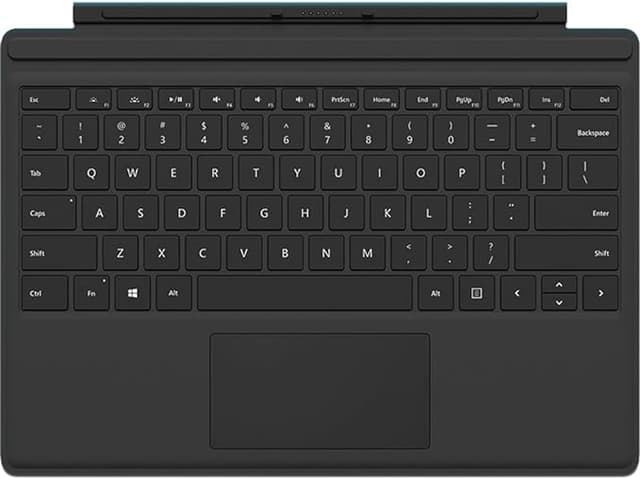
Microsoft Type Cover for Surface Pro - Black
Essential keyboard for Surface Pro users who need laptop-like productivity
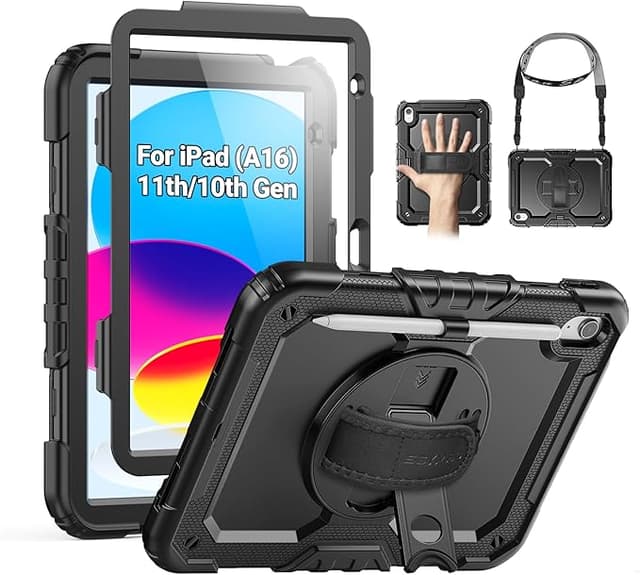
SEYMAC Case for iPad (A16) 11th/10th Generation
Sturdy heavy duty full-body shockproof protective case with rotating stand
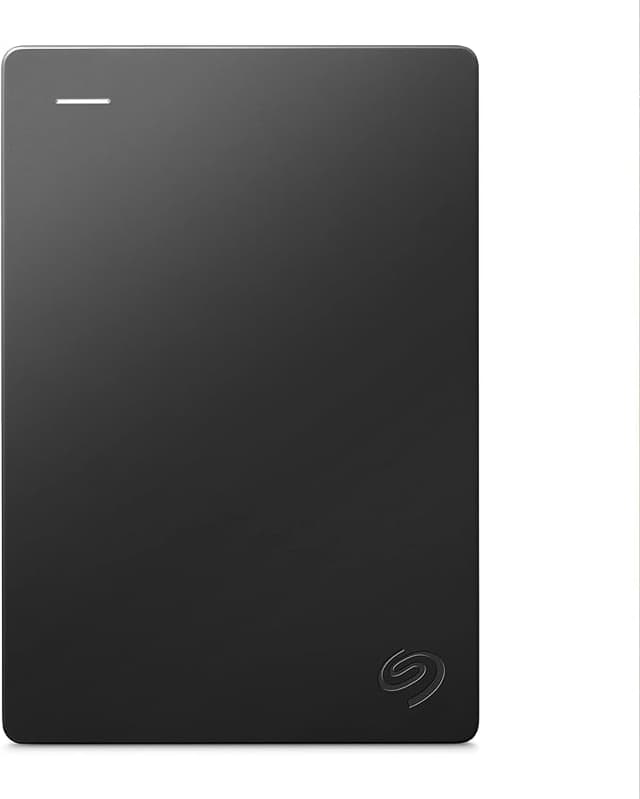
Seagate Portable 4TB External Hard Drive HDD
High-capacity external storage with USB 3.0 and 1-year rescue service
Accessory Buying Tips
- •Invest in a quality stylus for creative work - it makes a huge difference in precision and responsiveness
- •Choose protective cases that don't interfere with tablet functionality or stylus charging
- •Consider external storage early - professional work files can quickly fill up internal storage
- •Look for accessories with good warranties - professional use can be demanding on accessories
Frequently Asked Questions
What is the best pro tablet for creative professionals in 2025?
Quick Answer:
The iPad Pro 13-inch with M4 chip leads for creative professionals, with strong single-core and GPU performance, Apple Pencil 2 support, and access to professional apps like Procreate and Adobe Creative Suite.
The M4 chip delivers desktop-class performance in a portable form factor, making it perfect for digital art, photo editing, and video production workflows.
Should I choose iPad Pro or Surface Pro for business productivity?
Quick Answer:
For business productivity, Surface Pro 11 offers better Windows integration, desktop app compatibility, and multitasking capabilities, while iPad Pro excels in creative work and Apple ecosystem integration.
Surface Pro 11 runs full Windows 11, allowing you to use desktop applications like Microsoft Office, Adobe Creative Suite, and enterprise software without limitations.
What features should I look for in a professional tablet?
Quick Answer:
Key features include powerful processors, high-resolution displays, stylus support, long battery life, professional software compatibility, and solid build quality for daily professional use.
Look for tablets with at least 8GB RAM, 256GB storage, 4K display resolution, and 8+ hours of battery life for professional workflows.
Are professional tablets worth the investment over regular tablets?
Quick Answer:
Yes, professional tablets offer superior performance, better displays, stylus support, and professional software compatibility that significantly enhance productivity and creative capabilities compared to consumer tablets.
The additional cost is justified by the improved performance, better build quality, and professional features that can significantly boost your productivity and creative output.
How much should I spend on a professional tablet?
Quick Answer:
Professional tablets range from $800 to $2,500. Budget $1,200-$1,800 for excellent performance and features. Higher-end models offer better displays and processing power for demanding professional work.
Consider your specific needs - creative professionals benefit from the iPad Pro's premium features, while business users can save money with the Surface Pro 11.
Can I use a professional tablet as a laptop replacement?
Quick Answer:
Yes, many professional tablets can replace laptops for specific workflows. Surface Pro 11 runs full Windows 11, while iPad Pro with keyboard and trackpad offers laptop-like functionality for creative and productivity tasks.
However, consider your software needs - Windows tablets offer better desktop app compatibility, while iPad Pro excels in creative applications and Apple ecosystem integration.
What's the difference between iPad Pro and regular iPad?
Quick Answer:
iPad Pro features more powerful processors (M4 chip), larger displays, better cameras, Thunderbolt connectivity, and support for Apple Pencil 2. Regular iPads are more affordable but lack professional-grade performance and features.
For professional work, the iPad Pro's superior performance, display quality, and accessory support justify the higher price for most users.
How long do professional tablets typically last?
Quick Answer:
Professional tablets typically last 4-6 years with proper care. High-end models like iPad Pro and Surface Pro receive software updates for 5+ years, ensuring long-term usability and security.
Regular software updates, protective cases, and proper battery management can extend the lifespan of your professional tablet significantly.
What Are Our Final Recommendations?
After hands-on testing across real workflows, here's where each tablet earns its place in 2025:
Pick based on your ecosystem and what you actually do with the device. All three hold up to professional workloads — the right one depends on whether you live in Apple, Windows, or Android.
Picking the right tablet is one decision in a larger setup. If you edit video or photos on a laptop alongside your tablet, our best laptops for video and photo editing covers the machines that pair well with a tablet workflow. For a broader look at what's worth buying right now, the professional electronics hub covers laptops, monitors, and accessories with the same hands-on approach. Photographers adding a tablet to their kit should also read the Canon RF mount mirrorless lenses review before buying glass.
If you shoot video in the field, the action camera guide covers the compact options worth pairing with a tablet for on-site editing. For workspace security, see the smart home security guide and privacy-first smart home reviews. Content creators who work across devices should also look at the foldable smartphone guide and smart glasses technology reviews.
For audio work at the desk or on the go, the portable speaker reviews and portable projector guide round out a mobile setup. The wireless earbud comparisons and AirPods Pro 3 review are worth reading before you settle on earbuds for monitoring. On the desk side, the guides on gaming desk setups and home office monitors cover the hardware that matters most for editing comfort.
Keeping multiple devices charged without a cable tangle is easier with the right pad — the wireless charging pads guide covers the options that handle a tablet, phone, and earbuds simultaneously. The budget noise-cancelling headphones review is useful if you want focus on long editing sessions without spending much. For a look at how AI features are showing up in consumer devices right now, the AI-powered electronics guide breaks down what's real versus marketing.
If sustainability factors into your buying decisions, the eco-friendly electronics and sustainable technology options pages lay out what brands are actually doing differently. For smart home setups in a workspace, the invisible smart home tech guides and aging-in-place smart home guide cover practical configurations. Creators who track their work health will find the smartwatch recommendations and smart ring comparisons useful for monitoring without constant phone checks.
iPhone users pairing an iPad Pro with their phone should check the iPhone 17 Pro Max accessories guide for protection and add-ons that work across the ecosystem. Students on a tighter budget will find better-value picks in the back-to-school electronics guide. For dual-purpose users who game and create, the gaming laptop guide and gaming display comparison cover the hardware that handles both well. The fall 2025 tech gadgets guide tracks what launched this season across laptops, tablets, and wearables.
