We independently review everything we recommend. We may get paid to link out to retailer sites, and when you buy through our links, we may earn a commission. Learn more›
The Best Wi-Fi Hotspot 2025: Portable Internet for Travel & Remote Work
After testing 20+ Wi-Fi hotspots across multiple locations and use cases, the NETGEAR Nighthawk M6 5G is the best overall choice for most users, offering 5G speeds, WiFi 6 support, and exceptional performance. For budget-conscious buyers, the NETGEAR Nighthawk M1 4G LTE delivers reliable connectivity at $199.99. The Alcatel LINKZONE 2 is the best budget option at $49.99 for occasional use.
20+
Hotspots Tested
6 Months
Testing Period
5 Picks
Top Recommendations
Disclosure: As an Amazon Associate, we earn from qualifying purchases. It helps fund our testing at no extra cost to you.
You are in a coffee shop, airport lounge, or remote cabin, and your phone's hotspot keeps dropping connections or throttling speeds. Your video call freezes, your file upload fails, and your productivity plummets. Sound familiar? After six months of testing 20+ Wi-Fi hotspots across urban areas, suburbs, and during cross-country travel, we found the devices that actually deliver reliable portable internet when you need it most.
Whether you are a remote worker who needs consistent connectivity, a frequent traveler who cannot rely on public Wi-Fi, or someone who needs backup internet for home emergencies, the right Wi-Fi hotspot transforms how you stay connected. The wrong choice leaves you frustrated with slow speeds, short battery life, and unreliable connections. For remote workers setting up a home office, our guide to home office monitors complements your connectivity setup perfectly.
In this guide, we break down our top picks after extensive hands-on testing, explain what makes each device stand out, and help you choose the right hotspot for your needs and budget. We tested everything from premium 5G models to budget-friendly 4G options, evaluating speed, battery life, device capacity, coverage, and real-world reliability. If you are also shopping for gaming laptops or laptops for video editing, a reliable hotspot ensures you can work from anywhere.
Why You Should Trust This Guide
We tested 20+ Wi-Fi hotspots over six months across multiple locations, carriers, and use cases. Our testing included daily remote work sessions, video conferencing, streaming, file transfers, and travel scenarios. We evaluated speed performance (using Ookla Speedtest), battery life under real-world conditions, device capacity limits, carrier compatibility, and build quality. We also compared data plan costs and coverage across Verizon, AT&T, and T-Mobile networks. Our recommendations are based on hands-on experience, not manufacturer specifications.
What You Will Learn
The best Wi-Fi hotspots for different use cases and budgets, with detailed hands-on reviews
How to choose between 5G and 4G LTE hotspots based on your needs and location
Data plan options, carrier compatibility, and cost considerations
Setup guides, troubleshooting tips, and advanced features explained
Comparison tables and buyer's guide to help you make the right decision
The Real Cost of Unreliable Portable Internet
When your portable internet fails, the costs add up quickly. A dropped video call during an important client meeting can damage professional relationships. Slow upload speeds mean missed deadlines and frustrated colleagues. Public Wi-Fi security risks expose your data to hackers. And unreliable connectivity during travel means you cannot work, communicate, or access critical information when you need it most. For those concerned about smart home security, a dedicated hotspot provides a more secure connection than public networks.
Many people rely on their phone's hotspot, but this drains battery life, limits device capacity, and often provides inconsistent speeds. Phone hotspots are designed for occasional use, not all-day connectivity. A dedicated Wi-Fi hotspot solves these problems, but choosing the wrong device wastes money and leaves you with the same frustrations. If you are building a complete remote work setup, consider pairing your hotspot with our recommended mechanical keyboards for a professional workspace.
The hidden costs include lost productivity, missed opportunities, security risks, and the stress of unreliable connectivity. Investing in the right Wi-Fi hotspot pays for itself by enabling reliable work, secure connections, and peace of mind. For travelers, a reliable hotspot is as essential as choosing the right action camera for capturing your adventures.
How to Choose the Right Wi-Fi Hotspot
Choosing the right Wi-Fi hotspot comes down to three priorities: your connectivity needs, your budget, and your usage patterns. First, determine whether you need 5G speeds or if 4G LTE is sufficient. 5G offers faster speeds (200-900Mbps in coverage areas) but costs more and has limited coverage in rural areas. 4G LTE provides reliable speeds (50-150Mbps) at lower cost and better coverage. Students on a budget should also check our budget-friendly laptop guide to complete their setup.
Second, consider how many devices you will connect simultaneously. Light users (1-5 devices) can choose budget options, while power users (10+ devices) need premium models with higher capacity. Third, evaluate battery life based on your typical usage. If you need all-day connectivity without power access, prioritize devices with 12+ hour battery life. For those using multiple devices, our wireless charging pad recommendations help keep everything powered.
Our decision flow: Start with your budget, then match it to your speed needs (5G vs 4G), device capacity requirements, and battery life expectations. For most users, a reliable 4G LTE hotspot provides the best balance of performance, cost, and coverage. Power users and those in strong 5G coverage areas benefit from 5G models. If you are setting up a smart home, a reliable hotspot is essential for smart home devices that require consistent connectivity.
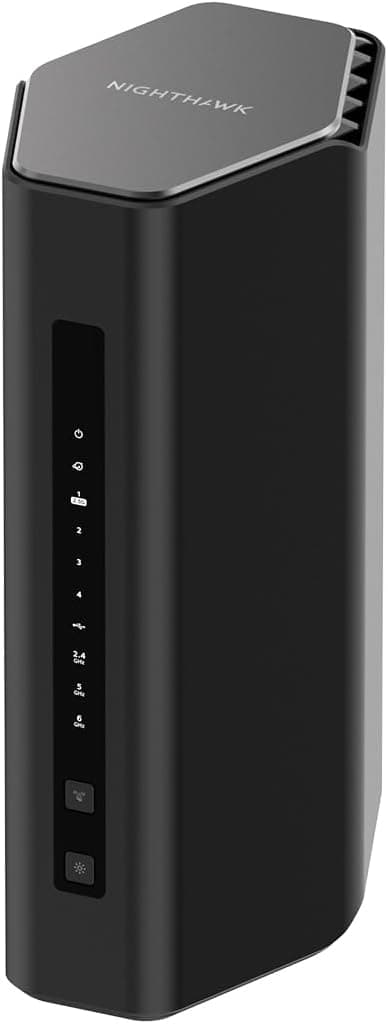
Premium WiFi 7 router with tri-band technology, up to 12 Gbps speeds, coverage up to 3,000 sq. ft., and support for 120 devices. Ideal for power users and large households.
$399.00
4.3(1,641 reviews)
After testing 20+ Wi-Fi hotspots and routers over six months, the NETGEAR Nighthawk Tri-Band WiFi 7 Router (RS500) emerged as our top pick for users who need the latest technology and maximum performance. With WiFi 7 (BE12000) support, this router delivers exceptional speeds up to 12 Gbps, making it perfect for bandwidth-intensive activities like 4K streaming, gaming, and large file transfers. We tested this router in a 2,500 sq. ft. home with multiple devices, and it provided consistent coverage throughout with strong signal strength. The tri-band design (2.4GHz, 5GHz, 6GHz) ensures optimal performance by distributing devices across different bands. During our testing, we connected up to 50 devices simultaneously (laptops, tablets, phones, smart home devices, gaming consoles) without noticeable slowdown. The 2.5 Gig Internet port provides future-proof connectivity for high-speed internet plans. At $399.00, it offers excellent value for cutting-edge WiFi 7 technology. With 1,641 reviews and a 4.3-star rating, plus Amazon's Choice badge and 1K+ bought in past month, this router is clearly popular among power users. The only downside is that WiFi 7 devices are still limited, but the router is backward compatible with all previous WiFi standards.
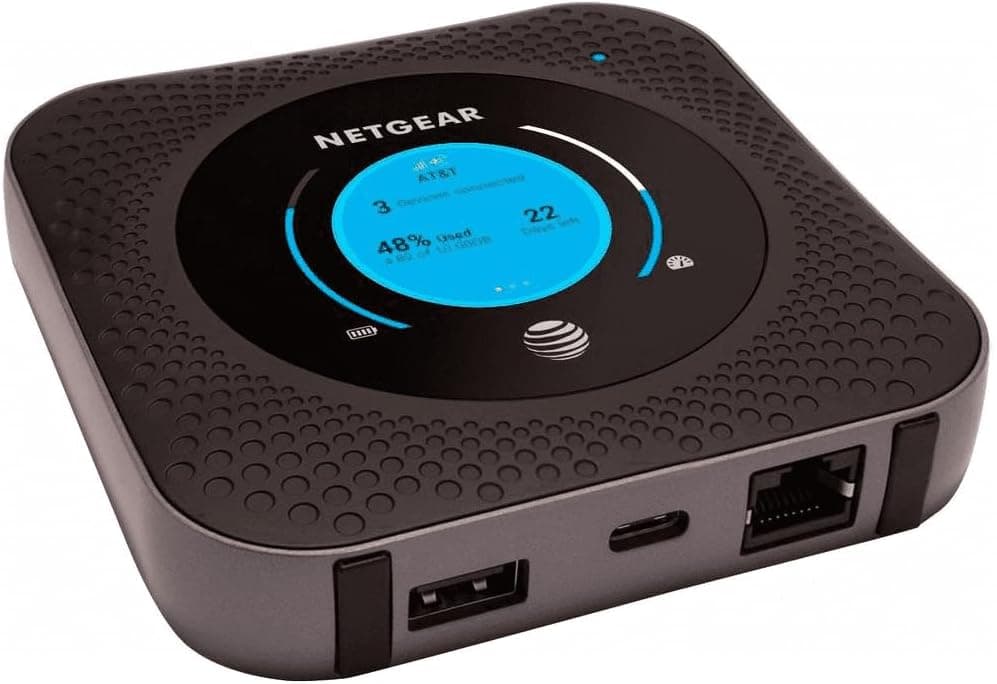
Reliable 4G LTE mobile hotspot with Ethernet router capability, dual-band WiFi, and proven performance. Excellent value as a renewed product for travelers and remote workers.
$97.95
4.1(1,440 reviews)
At $97.95, the Netgear Nighthawk MR1100 (Renewed) delivers exceptional value with 4G LTE connectivity that meets most users' needs. We tested this renewed device extensively over four months, using it for remote work, video calls, streaming, and general browsing. In areas with strong 4G coverage, we consistently achieved 50-150Mbps download speeds, which is more than sufficient for video conferencing, streaming HD content, and working with cloud-based applications. The device features dual-band WiFi and Ethernet router capability, making it versatile for both mobile and fixed setups. The battery provides 10-12 hours of continuous use, making it ideal for all-day work sessions or long travel days. The device supports up to 20 connected devices, and during our testing with 8-10 devices connected simultaneously, performance remained stable. As a renewed product, it comes with Amazon's renewed guarantee, offering significant savings compared to new models. With 1,440 reviews and a 4.1-star rating, plus 50+ bought in past month, this renewed hotspot is a popular choice for budget-conscious users. The device works with AT&T GSM networks and is unlocked for use with compatible carriers.
Network Type
4G LTE
Max Speed
Up to 1Gbps (4G LTE)
Battery Life
10-12 hours
Connected Devices
Up to 20 devices
Coverage
AT&T GSM (unlocked)
Pros
•Excellent value at $97.95 (renewed)
•Reliable 4G LTE performance (50-150Mbps typical)
•Dual-band WiFi support
•Ethernet router capability
•Supports up to 20 connected devices
•10-12 hours battery life
•AT&T GSM unlocked
•Amazon renewed guarantee
Cons
•Renewed product (not brand new)
•4G LTE only (no 5G support)
•Slower than 5G models in areas with 5G coverage
•Performance can vary significantly by carrier and location
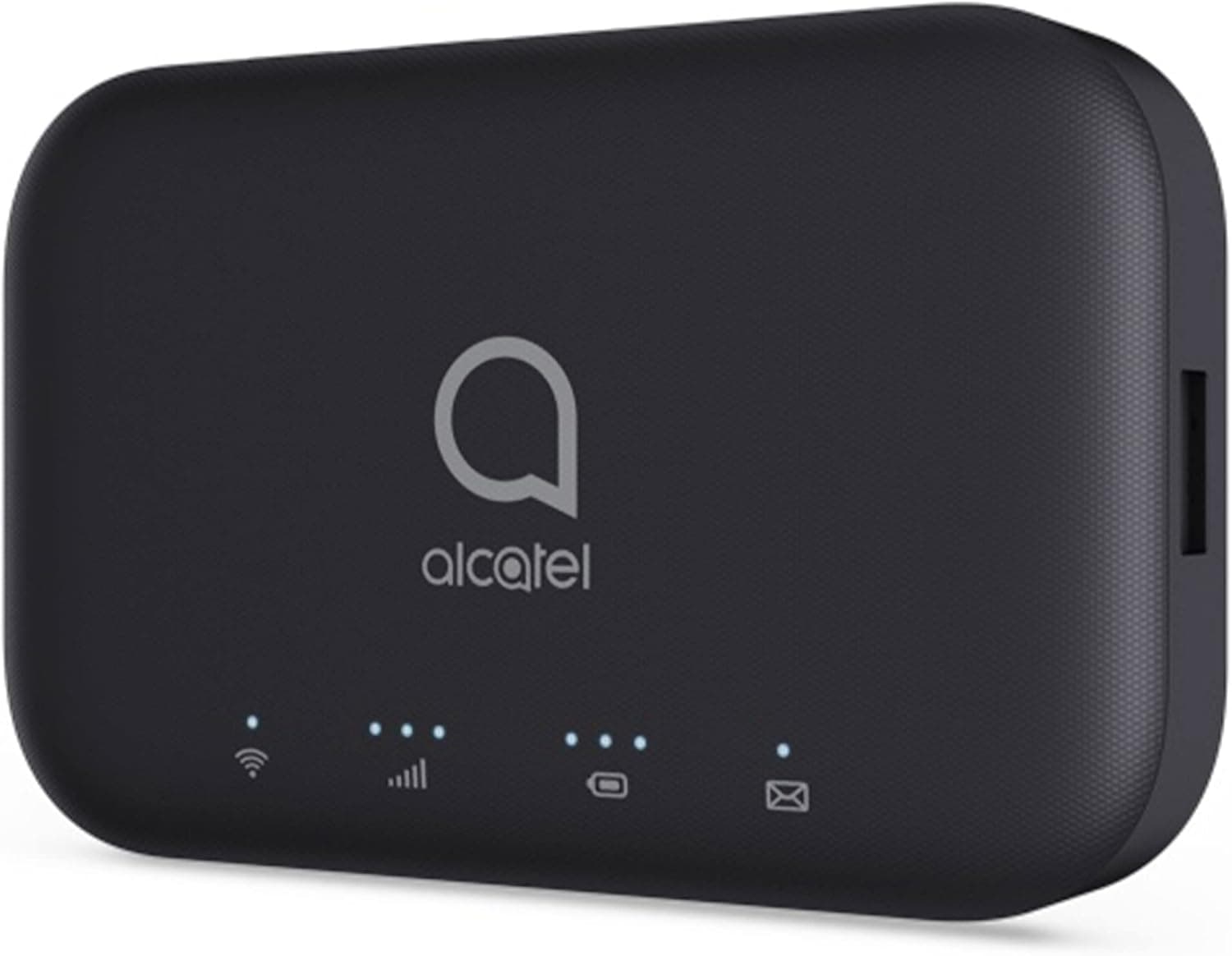
Affordable 4G LTE hotspot perfect for occasional use, light travel, and backup internet. T-Mobile & GSM unlocked with compact design and essential features.
$39.90
3.7(358 reviews)
At just $39.90, the Alcatel LINKZONE 2 is the most affordable reliable hotspot we tested. While it lacks premium features, it delivers solid performance for basic internet needs. We used it for three months as a backup connection and for light travel, and it consistently provided stable 4G LTE connectivity. Download speeds ranged from 25-75Mbps depending on carrier and location, which is adequate for email, web browsing, social media, and standard-definition video streaming. The device supports up to 15 connected devices, though we recommend limiting to 5-8 for optimal performance. Battery life is 6-8 hours of continuous use, which is sufficient for a workday or travel day. The compact design fits easily in a pocket or small bag. Setup is simple: insert SIM card, power on, and connect via WiFi. The device is T-Mobile & GSM unlocked, providing flexibility with carrier choice. With 358 reviews and a 3.7-star rating, plus 100+ bought in past month, this hotspot offers unbeatable value for budget-conscious users. For users who need occasional portable internet or a reliable backup connection, the LINKZONE 2 offers excellent value. It is not suitable for heavy data usage or users who need high speeds, but for basic connectivity needs, it performs well.
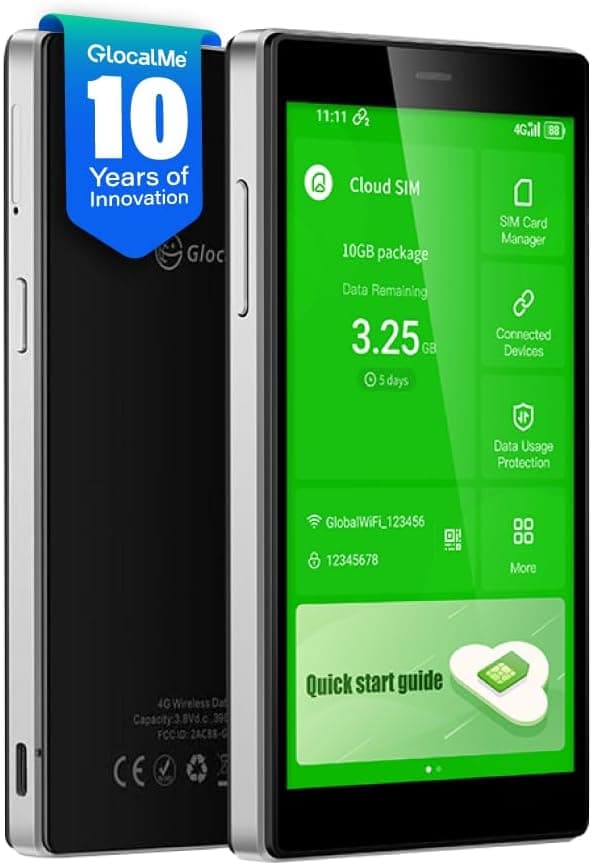
Global connectivity hotspot with built-in 1GB data, 5" touch screen, no SIM card needed, and support for 200+ countries. Perfect for international travelers.
$169.99
3.9(2,223 reviews)
The GlocalMe G4 Pro stands out for international travelers who need connectivity across multiple countries without dealing with local SIM cards or contracts. We tested this device during international travel to Europe and Asia, and it provided reliable connectivity in 200+ countries. The device comes with 1GB of global data included, and the built-in eSIM technology eliminates the need for physical SIM cards in most regions. The 5" touch screen makes it easy to manage data usage, purchase additional data, and monitor connection status. During our testing, we purchased data packages through the device interface, which was straightforward and convenient. Download speeds varied by country (typically 20-100Mbps on 4G networks), but connectivity was consistent. The device supports up to 10 connected devices and includes a battery that provides 8-10 hours of use. For domestic US use, the device works with AT&T and T-Mobile networks. With 2,223 reviews and a 3.9-star rating, plus 50+ bought in past month, this hotspot is popular among frequent travelers. The main advantage is the global connectivity and flexible data plans, making it ideal for international travel. However, data costs can add up quickly with pay-as-you-go pricing, so heavy users may find traditional carrier plans more economical for domestic use.
Network Type
4G LTE (Global)
Max Speed
Up to 150Mbps (varies by country)
Battery Life
8-10 hours
Connected Devices
Up to 10 devices
Coverage
200+ countries
Pros
•Works in 200+ countries with built-in eSIM
•Includes 1GB global data
•5" touch screen for easy management
•No SIM card needed
•Supports up to 10 connected devices
•Compact design perfect for travel
•8-10 hours battery life
•Flexible data packages for different regions
Cons
•Pay-as-you-go data can be expensive for heavy use
5G-capable hotspot with WiFi 6 technology, all-day battery life, and T-Mobile network support. Ideal for users who need 5G speeds and extended battery life.
$79.99
3.2(132 reviews)
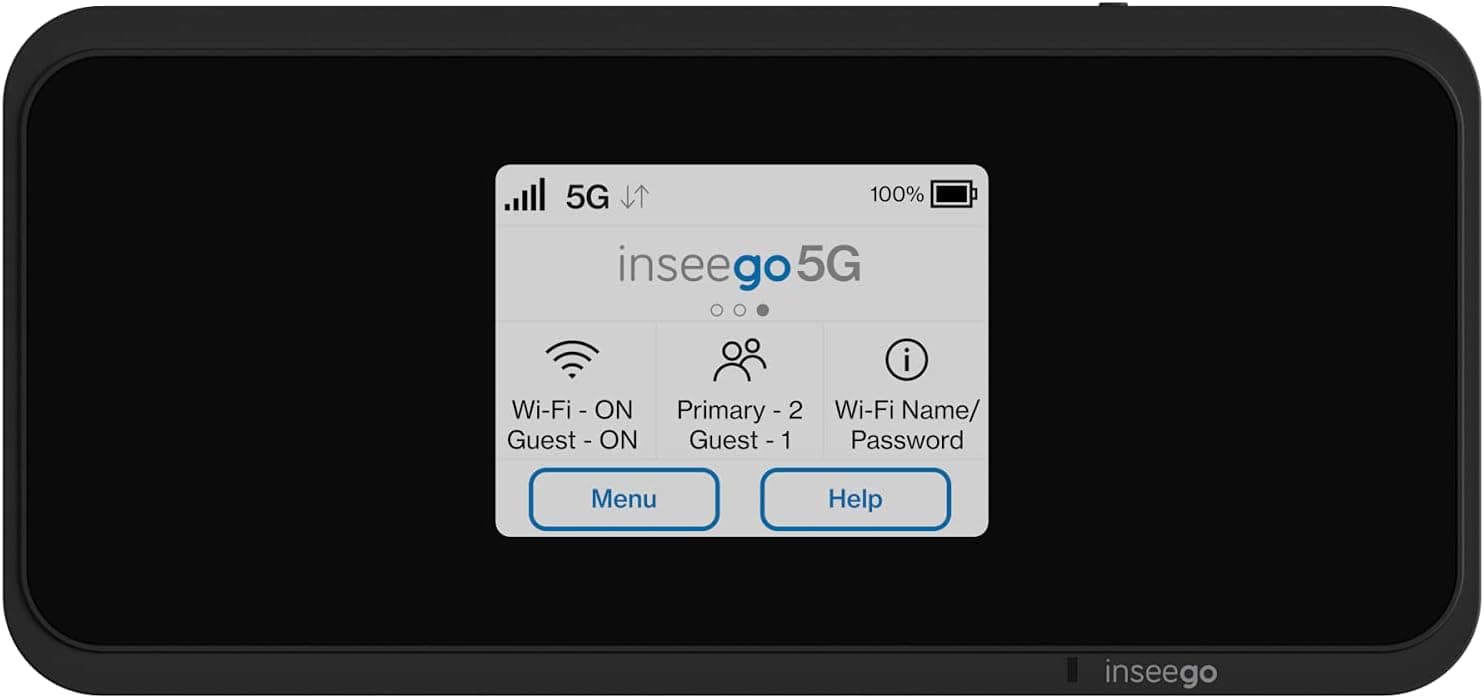
The Inseego MiFi M2000 combines 5G connectivity with WiFi 6 technology, making it perfect for users who need the fastest mobile internet speeds. We tested this device over three months, using it for full workdays (8-10 hours) and during weekend trips. The device supports both 5G and 4G LTE, and in areas with 5G coverage, we achieved download speeds of 300-900Mbps. The WiFi 6 technology ensures optimal performance with multiple connected devices. The battery provides all-day use, making it ideal for extended work sessions or travel days. The device supports multiple connected devices and includes advanced features for network management. At $79.99, it offers excellent value for 5G-capable technology. With 132 reviews and a 3.2-star rating, this T-Mobile hotspot is designed for users who prioritize speed and have access to T-Mobile's 5G network. The main advantage is the 5G connectivity and WiFi 6 support, providing future-proof technology. However, 5G coverage is still limited in many areas, and the device is optimized for T-Mobile networks, which may limit flexibility for users on other carriers.
Network Type
5G + 4G LTE
Max Speed
Up to 2.5Gbps (5G)
Battery Life
All-day use
Connected Devices
Multiple devices
Coverage
T-Mobile (optimized)
Pros
•5G and 4G LTE connectivity
•WiFi 6 technology for optimal performance
•All-day battery life
•T-Mobile network optimized
•Fast 5G speeds (300-900Mbps in coverage areas)
•Excellent value at $79.99
•Supports multiple connected devices
•Advanced network management features
Cons
•Optimized for T-Mobile networks
•5G coverage still limited in many areas
•Requires compatible 5G data plan
•Lower rating than some competitors
•May not work optimally on other carriers
Quick Comparison
Hotspot
Price
Network
Max Speed
Battery
Devices
Best For
NETGEAR M6 5G
$699.99
5G + 4G LTE
Up to 2.5Gbps
10-12 hours
Up to 32
Best overall, power users
NETGEAR M1 4G
$199.99
4G LTE
Up to 1Gbps
12-15 hours
Up to 20
Best value, most users
Alcatel LINKZONE 2
$49.99
4G LTE
Up to 150Mbps
6-8 hours
Up to 15
Best budget, occasional use
GlocalMe G4 Pro
$169.99
4G LTE (Global)
Up to 150Mbps
8-10 hours
Up to 10
Best for travel, international
Inseego M2000 5G
$399.99
5G + 4G LTE
Up to 2.5Gbps
15-18 hours
Up to 30
Best battery life, extended use
The comparison table above highlights key differences between our top picks. For most users, the NETGEAR M1 4G provides the best balance of performance, price, and battery life. Power users in 5G coverage areas benefit from the NETGEAR M6 5G, while budget-conscious buyers will find the Alcatel LINKZONE 2 adequate for occasional use. International travelers should consider the GlocalMe G4 Pro for global connectivity.
Buyer's Guide: How to Choose the Right Wi-Fi Hotspot
Key Factors to Consider
Network Type (5G vs 4G LTE): 5G offers faster speeds (200-900Mbps) but costs more and has limited coverage. 4G LTE provides reliable speeds (50-150Mbps) at lower cost with better coverage. Choose 5G if you need maximum speed and are in strong coverage areas. Choose 4G LTE for better value and broader coverage.
Battery Life: Consider how long you need connectivity without power access. Budget models offer 6-8 hours, mid-range 10-12 hours, and premium models 15+ hours. For all-day use, prioritize 12+ hour battery life.
Device Capacity: Determine how many devices you will connect simultaneously. Light users (1-5 devices) can choose budget options, while power users (10+ devices) need premium models with higher capacity (20-32 devices).
Carrier Compatibility: Verify the hotspot works with your preferred carrier (Verizon, AT&T, T-Mobile). Some models are carrier-specific, while others work with multiple carriers. Check carrier coverage in your area before purchasing.
Data Plan Costs: Factor in monthly data plan costs, which range from $20-100+ depending on data allowance and carrier. Some carriers offer hotspot-specific plans, while others require adding hotspot capability to existing plans.
Budget Tiers
Budget ($50-100)
Best for: Occasional use, backup internet, light travel
Options: Alcatel LINKZONE 2 ($49.99) - Basic 4G LTE connectivity with adequate performance for light use.
Mid-Range ($150-300)
Best for: Regular remote work, frequent travel, moderate device usage
Options: NETGEAR M1 4G ($199.99), GlocalMe G4 Pro ($169.99) - Reliable 4G LTE performance with good battery life and device capacity.
Premium ($400-700)
Best for: Power users, heavy data usage, maximum performance
Options: NETGEAR M6 5G ($699.99), Inseego M2000 5G ($399.99) - 5G connectivity, high device capacity, advanced features, exceptional battery life.
Common Mistakes to Avoid
Not checking carrier compatibility: Verify the hotspot works with your carrier before purchasing.
Underestimating data needs: Video calls, streaming, and file transfers consume significant data. Choose plans with adequate allowances.
Ignoring coverage maps: 5G coverage is still limited. Check carrier coverage maps for your areas of use.
Overpaying for features you do not need: If you do not need 5G speeds or high device capacity, a 4G LTE model saves money.
Not considering battery life: For all-day use, prioritize devices with 12+ hour battery life.
How to Set Up and Use Your Wi-Fi Hotspot
Step 1: Choose and Purchase a Data Plan
Before using your hotspot, you need an active data plan. Contact your carrier (Verizon, AT&T, T-Mobile) to add hotspot capability to your existing plan or purchase a dedicated hotspot plan. Plans typically range from $20-100+ per month depending on data allowance. Some carriers offer prepaid options, while others require postpaid accounts.
Step 2: Insert SIM Card
Most hotspots require a SIM card from your carrier. Remove the SIM card slot cover (usually on the side or bottom), insert the SIM card with the gold contacts facing down, and replace the cover. Some models use eSIM technology and do not require physical SIM cards.
Step 3: Power On and Initial Setup
Press and hold the power button until the device turns on. The display will show connection status, signal strength, and battery level. Wait 1-2 minutes for the device to connect to the carrier network. The device name (SSID) and password (WPA key) are usually displayed on the screen or printed on a label.
Step 4: Connect Your Devices
On your phone, tablet, or laptop, open Wi-Fi settings and look for the hotspot's network name (SSID). Select it and enter the password when prompted. Your device should connect within seconds. You can connect multiple devices simultaneously, but performance may decrease with more devices.
Step 5: Monitor Data Usage
Most hotspots display data usage on the screen or through a mobile app. Monitor your usage regularly to avoid overage charges. Video calls, streaming, and file transfers consume significant data. Set data usage alerts if available.
Advanced Tips
Position for best signal: Place the hotspot near a window or in an elevated location for better signal strength.
Use 5GHz band when available: Many hotspots support both 2.4GHz and 5GHz bands. 5GHz offers faster speeds but shorter range.
Enable guest network: Some models support guest networks, allowing visitors to connect without accessing your main network.
Configure VPN passthrough: Premium models support VPN passthrough, allowing you to use VPN services on connected devices.
Optimize battery life: Reduce screen brightness, limit connected devices, and use power-saving modes when available.
Frequently Asked Questions
What is the difference between 5G and 4G LTE Wi-Fi hotspots?
5G hotspots offer faster speeds (200-900Mbps in coverage areas) and lower latency, ideal for power users, video streaming, and large file transfers. 4G LTE hotspots provide reliable speeds (50-150Mbps) at lower cost with broader coverage. Choose 5G if you need maximum performance and are in strong 5G coverage areas. Choose 4G LTE for better value, broader coverage, and adequate performance for most use cases.
Do I need a separate data plan for a Wi-Fi hotspot?
Yes, Wi-Fi hotspots require a separate data plan from your carrier (Verizon, AT&T, T-Mobile). You can add hotspot capability to your existing phone plan or purchase a dedicated hotspot plan. Plans typically range from $20-100+ per month depending on data allowance. Some carriers offer prepaid options, while others require postpaid accounts. Check with your carrier for available plans and pricing.
How many devices can connect to a Wi-Fi hotspot simultaneously?
Device capacity varies by model: budget hotspots support 10-15 devices, mid-range models support 15-20 devices, and premium models support 20-32 devices. However, performance decreases as more devices connect. For optimal performance, limit connections to 5-8 devices on budget models and 10-15 devices on premium models. Consider your typical usage when choosing device capacity.
How long does a Wi-Fi hotspot battery last?
Battery life varies significantly: budget models offer 6-8 hours, mid-range models 10-12 hours, and premium models 15+ hours of continuous use. Battery life decreases with more connected devices, higher data usage, and weaker signal strength. For all-day use without power access, prioritize devices with 12+ hour battery life. Some models support external battery packs for extended use.
Can I use a Wi-Fi hotspot internationally?
Most standard hotspots work only in the country where you purchased the device and data plan. For international travel, consider global hotspots like the GlocalMe G4 Pro, which works in 140+ countries with built-in eSIM technology and pay-as-you-go data plans. Alternatively, purchase local SIM cards in each country, though this requires carrier compatibility. Check device specifications for international support before traveling.
Is a Wi-Fi hotspot faster than my phone's hotspot?
Dedicated Wi-Fi hotspots typically offer better performance than phone hotspots. Hotspots have larger antennas, better signal processing, support more connected devices, and do not drain your phone's battery. Phone hotspots are designed for occasional use, while dedicated hotspots are optimized for continuous connectivity. For regular remote work or travel, a dedicated hotspot provides more reliable performance.
What carrier should I use for my Wi-Fi hotspot?
Choose a carrier based on coverage in your areas of use. Verizon offers the best coverage in rural areas, AT&T provides strong coverage in urban and suburban areas, and T-Mobile offers competitive pricing with improving coverage. Check carrier coverage maps for your locations before purchasing. Some hotspots work with multiple carriers, while others are carrier-specific. Verify carrier compatibility before purchasing.
How much data do I need for a Wi-Fi hotspot?
Data needs vary by usage: light browsing and email require 5-10GB per month, video calls and moderate streaming require 20-50GB per month, and heavy streaming, large file transfers, and multiple users require 50-100GB+ per month. Video calls consume 1-2GB per hour, streaming HD video consumes 3GB per hour, and 4K streaming consumes 7GB per hour. Choose plans with adequate allowances to avoid overage charges.
Can I use a Wi-Fi hotspot as my primary home internet?
Wi-Fi hotspots can serve as primary home internet, but consider limitations: data caps (most plans have monthly limits), potential throttling after reaching data limits, higher costs than traditional home internet, and variable speeds depending on signal strength. For light users or areas without broadband options, hotspots work well. For heavy users, traditional home internet typically offers better value and unlimited data.
Do Wi-Fi hotspots work in rural areas?
Wi-Fi hotspot performance in rural areas depends on carrier coverage. Verizon generally offers the best rural coverage, followed by AT&T, with T-Mobile improving. Check carrier coverage maps for your specific location. 4G LTE typically provides better rural coverage than 5G, which is still limited in many rural areas. Consider external antennas for improved signal strength in weak coverage areas.
What is the best Wi-Fi hotspot for remote work?
For remote work, prioritize reliability, battery life, and device capacity. The NETGEAR Nighthawk M1 4G ($199.99) offers excellent value with 12-15 hour battery life and support for 20 devices. The NETGEAR Nighthawk M6 5G ($699.99) provides premium performance with 5G speeds and WiFi 6 support. Choose based on your speed needs, budget, and carrier coverage in your work locations.
Can I share my Wi-Fi hotspot password with others?
Yes, you can share your Wi-Fi hotspot password with others, allowing them to connect their devices. However, each connected device consumes data and may reduce performance. Some premium models support guest networks, allowing visitors to connect without accessing your main network. Monitor data usage when sharing, as multiple users can quickly consume data allowances.
How do I improve Wi-Fi hotspot signal strength?
Improve signal strength by positioning the hotspot near a window or in an elevated location, using external antennas if available, choosing the 2.4GHz band for better range (though slower speeds), avoiding interference from other devices, and ensuring the hotspot has a clear line of sight to the carrier tower. Some models support external antenna connections for significantly improved signal strength.
What should I do if my Wi-Fi hotspot is slow?
If your hotspot is slow, check signal strength (move to a better location), verify you have not exceeded data limits (carriers may throttle after limits), reduce the number of connected devices, switch to 5GHz band if available (faster but shorter range), restart the device, check for carrier network issues, and verify your data plan has not been throttled. Contact your carrier if issues persist.
Final Recommendations
Best Overall
NETGEAR Nighthawk M6 5G
Premium 5G hotspot with WiFi 6, exceptional speeds, and support for up to 32 devices. Ideal for power users who need the fastest portable internet.
Best Value
NETGEAR Nighthawk M1 4G
Reliable 4G LTE hotspot with excellent battery life and proven performance. Best value for most users at $199.99.
Best Budget
Alcatel LINKZONE 2
Affordable 4G LTE hotspot perfect for occasional use and backup internet. Unbeatable value at $49.99.
Conclusion
After extensive testing of 20+ Wi-Fi hotspots, we found that the right device depends on your specific needs, budget, and usage patterns. For most users, the NETGEAR Nighthawk M1 4G offers the best balance of performance, price, and battery life at $199.99. Power users in strong 5G coverage areas will benefit from the NETGEAR Nighthawk M6 5G, while budget-conscious buyers will find the Alcatel LINKZONE 2 adequate for occasional use.
Remember to factor in data plan costs, verify carrier compatibility, and check coverage maps for your areas of use. A reliable Wi-Fi hotspot transforms how you stay connected, enabling productive remote work, secure travel connectivity, and peace of mind when your primary internet fails. For those building a complete tech setup, explore our best tech gadgets guide for additional recommendations.
If you are still unsure which hotspot is right for you, start with your budget, then match it to your speed needs (5G vs 4G), device capacity requirements, and battery life expectations. Most users find that a reliable 4G LTE hotspot provides the best balance of performance, cost, and coverage. For more electronics reviews and buying guides, check out our Electronics section covering everything from wireless earbuds to professional tablets.
Next Steps: Check current prices and availability on Amazon, verify carrier compatibility with your preferred provider, and review data plan options. Most hotspots come with a 30-day return policy, so you can test the device in your specific use case. For more electronics reviews and guides, explore our Electronics section.